
 Kia Sorento: Wireless smartphone charging system: (if equipped)
The convenient wireless smartphone charging pad is neatly positioned in the forward storage tray right in front of the center console.
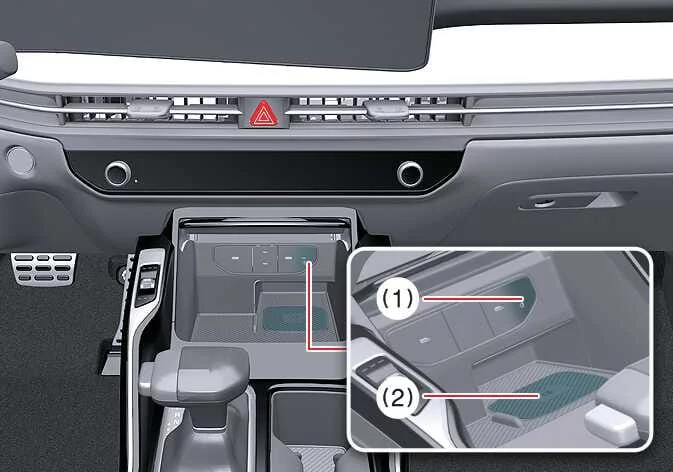
|
|
Securely close all cabin doors, and press the ENGINE START/STOP ignition button. To initiate rapid wireless energy transfer, place your compatible smartphone flat onto the center of the wireless charging pad.
For optimum wireless charging efficiency, always align your smartphone directly over the center sweet spot of the charging mat.
The integrated wireless charging system is engineered exclusively for single devices supporting Qi wireless technology. Please consult your phone case specifications or manufacturer documentation to verify Qi compatibility.
NOTE
If any conductive metallic objects—such as coins, foil wrappers, or metal keys—become trapped between your smartphone and the wireless charging pad, energy transfer will be immediately interrupted, and the foreign object can overheat dangerously.
 A/C inverter: (if equipped)
The high-capacity AC inverter supplies standard household-grade 115V/150W electrical power to operate approved
portable electronic equipment and utility accessories during your travels.
...
 Wireless smartphone charging in your Kia Sorento
Clear all foreign items, including your smart key or loose accessories, completely off the designated charging
surface. Any obstruction lying on the mat alongside your mobile device wil ...
See also:
High beam operation
To turn on the high beam headlights, push ...
Oil Cooler Installation
1.
Apply a light coat of engine oil to the oil cooler packing surface (A),
and then install the oil cooler with fix bolt (B).
Tightening torque:
...
Power Door Lock Switch Diagnosis With GDS
1.
It will be able to diagnose defects of door lock with GDS quickly.
GDS can operates actuator forcefully, input/output value monitoring
and self diagnosis.
...