
 Kia Sorento: Automatic climate control system (If equipped)
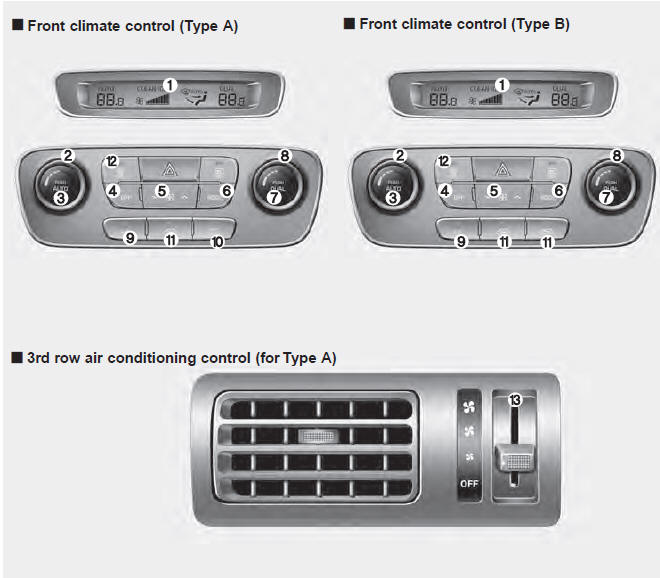
1. A/C display
2. Driver's temperature control knob
3. AUTO (automatic control) button
4. Front blower OFF button
5. Front fan speed control switch
6. Mode selection button
7. Dual temperature control selection button
8. Passenger's temperature control knob
9. Air conditioning button
10. 3rd row air conditioning ON/OFF button (controlled from the front)
11. Air intake control button or recirculated air position button
12. Front windshield defroster button
13. 3rd row air conditioning fan speed control switch
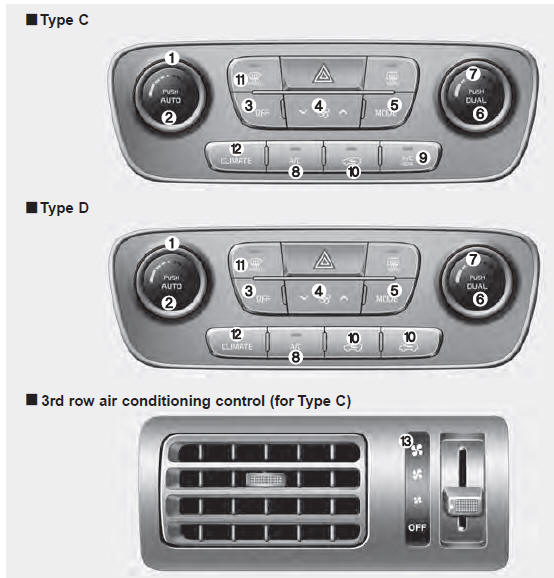
1. Driver's temperature control knob
2. AUTO (automatic control) button
3. Front blower OFF button
4. Front fan speed control switch
5. Mode selection button
6. Dual temperature control selection button
7. Passenger's temperature control knob
8. Air conditioning button
9. 3rd row air conditioning ON/OFF button (controlled from the front)
10. Air intake control button or recirculated air position button
11. Front windshield defroster button
12. Climate control display
13. 3rd row air conditioning fan speed control switch
Automatic heating and air conditioning
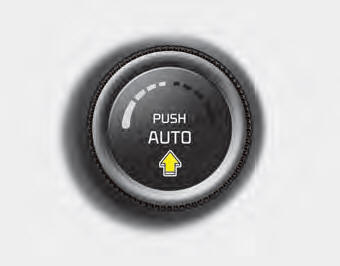
1. Press the AUTO button. The modes, fan speeds, air intake and air-conditioning will be controlled automatically by setting the temperature.
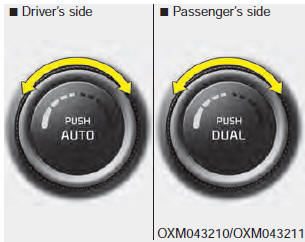
2. Turn the temperature control knob to the desired temperature.
✽ NOTICE
- To turn the automatic operation off, select any button or switch of the following: Mode selection button Air conditioning button Front windshield defroster button Air intake control button Fan speed control switch The selected function will be controlled manually while other functions operate automatically.
- For your convenience and to improve the effectiveness of the climate control, use the AUTO button and set the temperature to 73°F (23°C).
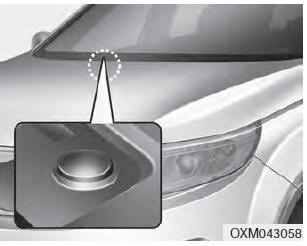
✽ NOTICE
Never place anything over the sensor located on the instrument panel to ensure better control of the heating and cooling system.
 Climate control air filter (if equipped)
The climate control air filter installed behind the glove box filters the dust
or other pollutants that come into the vehicle from the outside through the heating
and air conditioning system.
If ...
 Manual heating and air conditioning
The heating and cooling system can be controlled manually by pressing buttons
or turning knob(s) other than the AUTO button. In this case, the system works sequentially
according to the order of but ...
See also:
Auto Head lamp leveling Unit Description
According to driving environment and loading state of vehicle, head lamp
lighting direction is changed to keep the driver's visibility range and to protect
the driver's vision from gl ...
Engine And Transmission Assembly Installation
Install the other parts in reverse order of removal.
Perform the following :
•
Adjust a shift cable.
•
Refill engine with engine oil.
...
Installation
•
Install the component with the specified torques.
•
...
Categories
- Home
- First Generation
- Second Generation
- Kia Sorento XM 2011-2026 Owners Manual
- Kia Sorento XM 2011-2026 Service Manual
