
 Kia Sorento: NFC Key Card Registration
Kia Sorento (MQ4, 2021-2026) Service Manual / Body Electrical System / Digital Key System / NFC Key Card Registration
| NFC Key Card Registration Process |
The digital key system provides an NFC key card for emergency purposes, such as when a smartphone cannot be
delivered directly, such as valet parking, or when the smartphone battery is off.
The card key must be registered in the vehicle for the first time after the vehicle is shipped or the first time
after replacing the BDC to be used.
NFC Key Card Registration Process
You should follow the steps in the procedure below to register NFC key card.
| 1. |
Make the vehicle enable to register NFC key card.
|

 It can be registered with KDS - S/W Management - "Card Key Registration Mode
Activation".
 It also can be registered digital key app available in the vehicle.
| 2. |
You should register the NFC key card on AVNT or the cluster within 5 minutes after getting in the vehicle.
|
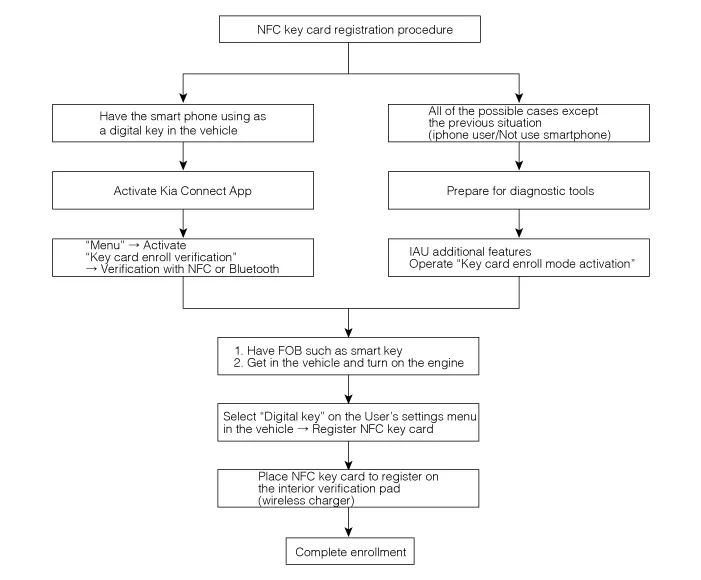

NFC Key Card Registration by using the KDS.
| 1. |
Perform the "Card Key Registration Mode Activation" by using the KDS.
(S/W Management → BDC-IAU → Card Key Registration Mode Activation)
|
| 2. |
After placing the card key on the NFC wireless charger, register the card key on the ccNC screen.
|
| 3. |
Place the NFC key card that you want to register on the interior authentication pad (Wireless charger) to
complete the process.
|
Description
Digital key system allows a driver to lock or unlock the vehicle doors with smartphone app or a NFC key card
without a smart key.
Main features of digita...
 Description and Operation
On Vehicle Inspection
Digital Key System Operation Verification
–
When the digital key system failure occurs, the system operation ...
 Digital Key System Inspection
See also:
Rear Assist Arm Removal
1.
Remove the rear wheel and tire (A) from rear hub .
Tightening torque :
88.2 ~ 107.8 N.m (9.0 ~ 11.0 kgf.m, 65.0 ~ 79.5 lb-ft)
...
Oil hydraulic Motor(Actuator) Removal
1.
Remove the coupling assembly.
(Refer to Coupling Assembly - "Direct Electro Hydraulic Actuator
Coupling")
2.
Keep goin ...
Rear Corner Radar Removal
Removal
Rear Corner Radar
1.
Perform the order below with the KDS before replacing the rear corner radar.
(S/W Management ↠...
Manuals list
- Kia Sorento MQ4 2021-2026 Owners Manual
- Kia Sorento XM 2011-2015 Owners Manual
- Kia Sorento XM 2011-2015 Service Manual

Copyright © www.ksmanual.com 2014-2026 - 0.0551