 Kia Sorento: Digital Key System Inspection
Digital Key System Operation Verification
|
–
|
When the digital key system failure occurs, the system operation should be confirmed as below.
|
| 1. |
Checked the lock/unlock operation by touching the NFC antenna portion of the door handle with a smart phone
or NFC card key.
|
| 2. |
Check whether the start-up is working or not after placing your smart phone or key card on the wireless
charger.
|
| 3. |
Make sure confirm whether BLE lock or unlock are operable with the smart phone.
|
| 4. |
If there is an abnormality in the operation of the digital key system, the inspection is performed
according to the "Digital Key System A/S procedure" below.
|
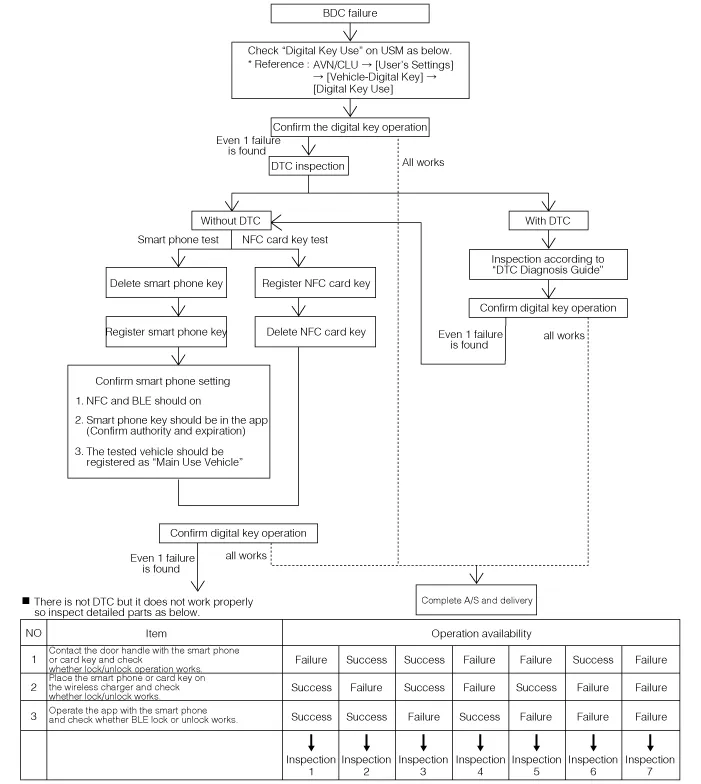
Digital Key System A/S Procedure
|
•
|
To inspect the digital key, vehicle owner’s smart phone or NFC card key is required. If you do not
have both of those, you should register new NFC card key and complete the test before delivering the
vehicle.
|
|
•
|
Once a new NFC key card is registered, the existing NFC key card is not available.
|
|
Inspection 1 :
Check whether the door handles of driver’s seat and passenger’s seats work properly. If the door
handle of the driver’s seat fails to operate, the handle should be checked after replacing with
passenger’s seat door handle.
If it works properly, only the door handles of driver’s seat should be replaced since it does not
have problem with wiring.
If both of those handles do not work, the door handles of driver’s seat and passenger’s seat should
be replaced with a new handle to check whether it works properly.
If it performs normally, the handle should be replaced with a new one. For the components that do
not work properly require DTC diagnosis, therefore assume (B166D00 driver’s seat door handle
malfunction) or (B166E00 passenger’s seat door handle malfunction) occur and proceed with the
inspection following the DTC diagnosis guide.
|
|
Inspection 2 :
Check whether the tart-up with the digital key (smart phone or card key) after replacing with new
wireless charger.
If it works properly, the vehicle can be delivered with the function on since it does not have a
problem with wiring.
If it does not work even after replacing with a new product, the wireless charger wiring should be
checked.
|
|
Inspection 3 :
After replacing with a new BLE module, check whether the digital key works.
If it does not work even after replacing with a new product, the wireless charger wiring should be
checked.
If there is not a problem with wiring, we assume (B165A00 BLE module malfunction), (B167F00 LIN
communication failure between IAU and BLE modules) occurs and process inspections in accordance with
“DTC Diagnosis Guide”.
|
|
Inspection 4 :
Process above “Inspection 1” and “Inspection 2” in order.
|
|
Inspection 5 :
Process above “Inspection 1” and “Inspection 3” in order.
|
|
Inspection 6 :
Process above “Inspection 1” and “Inspection 3” in order.
|
|
Inspection 7 :
If it operates without any problem after processing from No.1 to No.3 with the digital key, the
vehicle can be delivered with the function on since it does not have a problem with wiring.
If it does not work, assume that (B165C00 IAU-BDC learning anomaly) has occurred and perform a
check according to the "DTC Guide".
If still does not operate, “Inspection 1”, “Inspection 2”and “Inspection 3” should be processes in
order.
If any one of the three works normally, check the wiring of the remaining cases, and if all three
do not work, replace the BDC with a new one and perform "EMS/FOB learning" and "IAU-IBU
learning".
Since BDC has been replaced with a new one, perform "Check 1," "Check 2," and
"Check 3" in order to verify the system operation.
|
|
IAU-IBU learning status inspection
|
Digital key function works only when the IAU and IBU are in 'learnt' state.
|
| 1. |
Perform the "Status Information" procedure by using the KDS.
(S/W Management → BDC-IAU → IAU Status Information)
|
Refer to the KDS screen for operating conditions and details
|
Mark
|
Description
|
Learning status
|
Virgin
|
Initial state
|
Non-learning state
|
Learnt
|
Learning completion state
|
Learning completion state
|
Neutralized
|
Neutral state
|
Non-learning state
|
|
Smartphone Key Registration Status Inspection
|
Smart phone key registration status can be checked via "Data Analysis".
|
| 1. |
Connect KDS to vehicle.
|
| 2. |
Select the "Data Analysis" and "IAU".
Mark
|
Description
|
Owner's smartphone registration state
|
0 : Main user's smart phone is not registered.
|
1 : Main user's smart phone is registered.
|
Number of currently registered digital key (smartphones)
|
0 : No registered phone.
|
1-4 : Currently registered device number.
|
|
NFC Key Card registration status Inspection
|
Smart phone key registration status can be checked via "Data Analysis".
|
| 1. |
Connect KDS to vehicle.
|
| 2. |
Select the "Data Analysis" and "IAU".
Mark
|
Description
|
Number of currently registered digital key (card key)
|
0 : No registered card.
|
1 : registered 1 card.
|
|
NFC Key Card Registration Process
The digital key system provides an NFC key card for emergency purposes, such as when a smartphone cannot be
delivered directly, such as valet parking,...



 NFC Key Card Registration
 Removal and Installation
