
 Kia Sorento: LCD display
You can easily customize and change the LCD display modes on your Kia Sorento using the convenient control buttons mounted on the steering wheel.
LCD display control
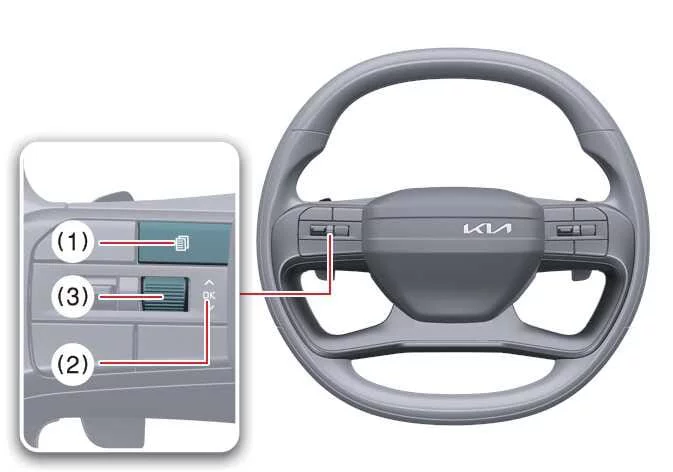
|
|
Switch |
Control |
Action |
|---|---|---|
|
Mode (1)
|
Short Press |
Changing view modes |
|
OK (2) |
Short Press |
Operating additional functions |
|
Long Press |
Resetting menu information |
|
|
Up/Down (3)  , , 
|
Short Roll |
Searching utility information |

 Kia Sorento Indicator Lights and System Status Overview
 LCD display modes
See also:
Overhead Console Lamp Removal
1.
Disconnect the negative (-) battery terminal.
2.
Remove the mounting screws (2EA).
And then remove the overhead console (A).
...
Catalytic Converter Installation
1.
Install in the reverse order of removal.
...
Compressor Components
1. Center Bolt
2. Hub Bolt
3. Hub Assembly
4. Snap Ring
5. Pulley
6. Compressor Assembly
7. Electric Control Valve
...
Manuals list
- Kia Sorento MQ4 2021-2026 Owners Manual
- Kia Sorento XM 2011-2015 Owners Manual
- Kia Sorento XM 2011-2015 Service Manual
