
 Kia Sorento: How to Use Digital Key 2 (Smartphone Integration)
Smartphone Touch Control
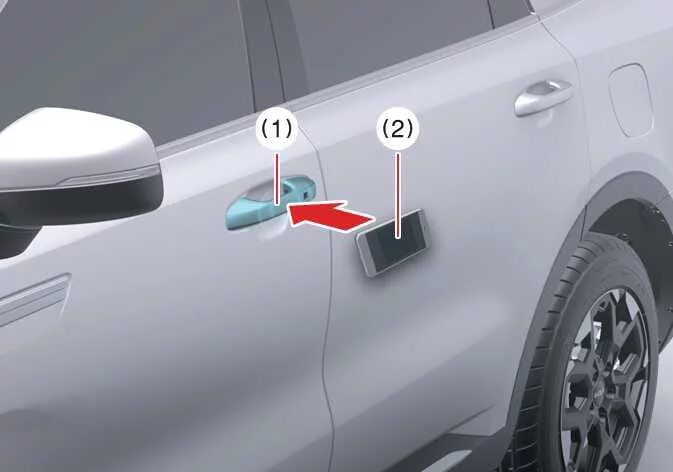
Kia Sorento owners can effortlessly lock, unlock, and drive their crossover without manually launching the Kia Access app. By simply bringing your compatible smartphone into close proximity or tapping it against the door handle, the vehicle recognizes your encrypted authorization profile. Once inside, placing the device on the wireless charging pad enables instant ignition access. To ensure seamless wireless communication, verify that your smartphone's internal Near Field Communication (NFC) transceiver aligns directly with the authentication sensor built into the vehicle door handle.
|
|
NFC antenna placement varies significantly depending on your device brand and hardware generation. For instance, Apple iPhone® models integrate the NFC chip near the top edge on the back of the device, whereas the Apple Watch® places its antenna directly behind the central glass display—typically matching the exact contact point used for Apple Pay transactions. Android smartphones may position their NFC hardware near the center back plate or surrounding the rear camera module. If you are uncertain about the precise placement on your phone, consult your device manufacturer's hardware specifications for contactless payment placement.
Locking and Unlocking the Doors
-
To lock or unlock your Kia Sorento, hold your smartphone's NFC antenna flush against the authentication pad on either the driver or front passenger exterior door handle for at least 2 seconds.
-
When unlocked via Digital Key 2, all vehicle doors will automatically relock after 30 seconds as an active security measure unless a door is opened during that timeframe.
-
If the system does not recognize your digital key on the first attempt, pull the smartphone back at least 4 inches (10 cm) away from the door handle surface to reset the signal before retrying.
Digital Key 2 leverages two distinct wireless standards: Ultra-Wideband (UWB) technology provides high-precision spatial tracking for hands-free proximity detection, whereas Near Field Communication (NFC) relies on short-range touch contact.
For smartphones without UWB support:
To operate door locking mechanisms using an NFC-only smartphone, hold the phone's internal antenna directly against the touch authentication zone on the Kia Sorento exterior door handle for approximately 2 seconds until the optical turn signals flash to confirm access.
For smartphones with UWB support:
-
To manually trigger door locks, carry your UWB-enabled smartphone in your pocket or bag and touch the touch-sensitive lock/unlock sensor (the subtle indented or curved area) located on the outer door handle surface.
-
When the Approach Unlock feature is activated in the Kia Sorento infotainment system settings, the vehicle detects your UWB device upon approach and automatically unlocks the doors without requiring physical contact.
TIP
If you remain stationary within the UWB detection zone near your Kia Sorento for several minutes without opening a door, the automatic approach feature may temporarily pause to save power and require physical handle touch.
Carrying your smartphone inside a heavy backpack, thick leather bag, or rear pant pocket can attenuate Bluetooth Low Energy (BLE) and UWB radio signals, resulting in response delays when attempting to lock, unlock, or start the vehicle.
Metallic aftermarket window tint films applied to front door glass can interfere with signal propagation, potentially impairing Digital Key 2 performance.
NOTE
The Digital Key 2 system will intentionally disable unlocking functionality and sound an audible warning chime under any of the following operational conditions:
An authorized physical smart key fob is left detected inside the cabin space.
The Kia Sorento ignition system is currently set to the ACC or ON state.
You attempt to engage door locks while any vehicle door, the engine hood, or the rear liftgate remains unlatched.
Metallic aftermarket window films are obstructing antenna transmission paths on adjacent glass surfaces.
Starting the Vehicle
To initiate driving mode in your Kia Sorento, place your registered smartphone onto the console wireless charging pad, depress the foot brake pedal firmly, and push the ENGINE START/STOP button. Once the powertrain activates and instrument cluster indicators illuminate, the smartphone may be safely removed from the pad without interrupting engine operation. Refer to the engine starting section for comprehensive drive-mode procedures.
For smartphones without UWB support:
-
Position your smartphone flat on the center of the wireless charging pad so its NFC transceiver directly overlays the vehicle's interior reader pad. Depress the brake pedal and press the ENGINE START/STOP button.
-
Once the engine runs, you can take your smartphone off the pad for handheld navigation or media streaming.
-
Thick protective cases or off-center NFC chip placement may occasionally cause communication dropouts. If the vehicle fails to authorize ignition, slightly adjust the smartphone position toward the left or right edge of the tray.
For smartphones with UWB support:
-
Keep the UWB smartphone inside the passenger compartment, depress the brake pedal, and press the ENGINE START/STOP button to activate the drive system without placing the device on the pad.
-
For remote engine activation, use your phone manufacturer's wallet interface or connected service app to execute a door lock command, then press and hold the remote start icon within 4 seconds. The Kia Sorento engine will start, and hazard warning lights will illuminate to verify active remote run status.
-
To shut off the engine during a remote start sequence, tap the remote start command button again in the mobile application interface.
WARNING
Placing an authorized digital key smartphone on the center console authentication pad enables immediate engine start capability. Never leave unsupervised children or vulnerable individuals inside the Kia Sorento with a registered device, as unauthorized vehicle operation could cause severe injury or death. Always keep your digital key smartphone in your personal possession when exiting the vehicle to prevent unauthorized access or theft.
TIP
When initializing Digital Key 2 access granted via key sharing protocols, initial authentication response time may take slightly longer than usual during first-time handshake routines.
Hold your shared digital key device steadily against the door handle authentication pad until the locking mechanism fully cycles to complete initial cryptographic registration.
If first-time authorization fails using interior pads, cycle the driver door locks using physical touch points first to clear pending wallet validation steps.
Operating the Liftgate
For smartphones with UWB support:
-
When the Kia Sorento is locked, carry your authorized UWB smartphone near the rear bumper and press the physical liftgate release switch to open the tailgate automatically.
-
If the Smart Liftgate feature is enabled in vehicle settings, standing within the detection zone behind the tailgate for longer than 3 seconds while carrying your Digital Key 2 device triggers automatic power opening without manual touch.
CAUTION
Ensure your registered smartphone remains on your person before closing the power liftgate. Closing the tailgate while the cabin is locked—or executing a lock command via mobile wallet—may prevent exterior handle access if the phone is inadvertently shut inside the cargo area.
Because an authorized smartphone on the interior charging pad enables vehicle start capabilities, never leave children unattended inside the vehicle with access to a registered device. Always carry your device with you upon exiting to prevent vehicle theft.
Metallic aftermarket window tinting can degrade high-frequency Bluetooth signal propagation, leading to intermittent key recognition errors around the perimeter of the vehicle.
Signal attenuation caused by storing the smartphone in deep pockets, heavy jackets, or shielded bags may cause slight processing delays during door locking, unlocking, or engine start authorizations.
On devices supporting UWB, full Digital Key 2 passive entry functionality relies on an active Bluetooth connection established between your smartphone and the vehicle controller.
-
Effective Bluetooth operating range varies depending on physical surroundings, surrounding physical barriers, and electromagnetic radio interference.
-
Substances containing metallic elements, such as metallized ceramic window films, can degrade Bluetooth antenna transmission ranges.
-
Carrying your mobile device inside bags, purses, or rear pockets may obstruct signal paths, causing slight latency when locking, unlocking, or starting your Kia Sorento.
To preserve vehicle battery reserve and extend smartphone battery lifecycle, Digital Key 2 proximity standby functions operate on a managed power schedule. You can audit active link states at any time through system settings or your smartphone manufacturer's wallet management app.
 How to Register Digital Key 2 (Smartphone)
Kia Digital Key 2 technology expands smartphone integration for your Kia Sorento, allowing secure vehicle access and
keyless engine operation via Ultra-Wideband (UWB) and Near Field Communication ...
 How to Delete Digital Key 2 (Smartphone Keys)
To safely delete or revoke smartphone digital key access from your Kia Sorento system memory, launch the vehicle
using your primary physical smart key fob. Keep the smart key inside the passenger ...
See also:
HomeLink® 5 programming flow chart
...
Brake Line Removal
1.
Disconnect the brake fiuid level switch connector, and remove
the reservoir cap.
2.
Remove the brake fluid from the master cylinder rese ...
Engine compartment
The actual engine compartment layout in your specific Kia Sorento model may differ slightly from the provided illustration based on regional specifications.
Engine ...