
 Kia Sorento: Electrochromic mirror (ECM) with HomeLink® system (if equipped)

|
-
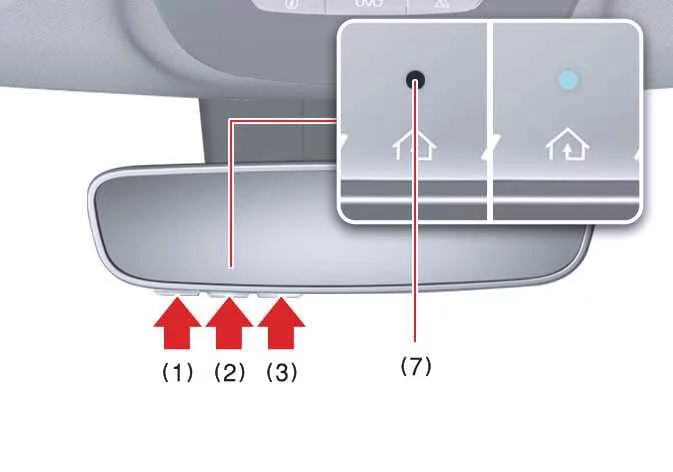
HomeLink Channel 1
-
HomeLink Channel 2
-
HomeLink Channel 3
-
Garage Door Opener Status Indicator showing closing or closed status
-
HomeLink Operation Indicator light
-
Garage Door Opener Status Indicator showing opening or opened status
-
HomeLink User Interface Indicator display
Your Kia Sorento may feature an advanced Gentex Automatic-Dimming Rearview Mirror equipped with an integrated HomeLink® Wireless Control System.
During nighttime excursions, this smart mirror automatically identifies and suppresses intense headlight glare from trailing vehicles. Meanwhile, the built-in HomeLink® Universal Transceiver empowers you to seamlessly activate garage doors, electronic security gates, exterior residential lighting, and other compatible automated systems directly from your cabin.
Automatic-Dimming Night Vision Safety™ (NVS®) Mirror (if equipped)
The NVS® Mirror actively minimizes glare by constantly evaluating ambient light conditions surrounding both the front and rear of your vehicle. Any foreign objects or accessories that physically obstruct the light sensor will negatively interfere with this automatic dimming functionality.
For more detailed technical insights regarding NVS® mirrors and related automotive applications, please explore the official Gentex website: www.gentex.com
Your mirror will instantly commence dimming the moment it detects blinding glare originating from automobiles traveling immediately behind you.
The anti-glare system automatically reverts to the active ON default state every time you start the engine of your Kia Sorento.
Integrated HomeLink® Wireless Control System
The HomeLink® Wireless Control System delivers exceptional convenience by letting you consolidate up to three separate handheld radio-frequency (RF) transmitters into your vehicle, enabling effortless activation of garage door openers, automated entry gates, door locks, security panels, and home lighting.
TIP
To maintain household security when your Kia Sorento is parked outside your garage overnight, the HomeLink transceiver will exclusively operate when the vehicle ignition is turned to the ACC or ON position.
Before initiating the programming sequence for a garage door opener or security gate, verify that all people, pets, and physical obstacles are completely cleared away from the moving equipment to avoid potential injury or property damage. We strongly recommend parking outside the garage while programming your system.
Never attempt to link HomeLink with legacy garage door openers that lack safety stop and automatic reverse mechanisms compliant with U.S. federal safety regulations (including any opener produced prior to April 1, 1982). A garage door incapable of detecting obstructions to reverse automatically fails to meet current federal safety guidelines. For further assistance, visit the HomeLink website at www.homelink.com or speak directly with customer support at 1-800-355-3515.
Furthermore, installing a fresh battery into your handheld remote transmitter prior to pairing guarantees stronger signal transmission and faster, more reliable programming with your vehicle.
2. Operating HomeLink®
-
Operating HomeLink®
-
Press and release your previously programmed HomeLink® button (designated as 1, 2, or 3).
TIP
The HomeLink® indicator light (7) should illuminate in a solid or flashing green pattern, and your targeted automated device should activate immediately.
If the device fails to respond, the initial programming attempt was unsuccessful, requiring you to repeat the pairing procedure for that specific button.
-
-
Two-Way Communication Display Behavior
-
Press and release one of your configured HomeLink® buttons (1, 2, or 3).

-
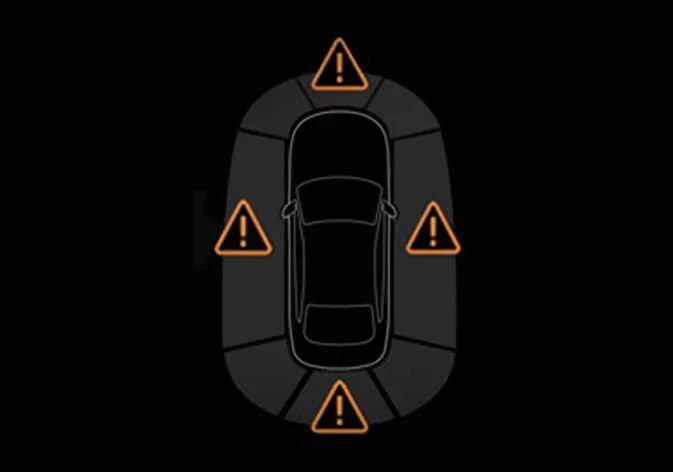
The status indicators (4) and (6) operate according to specific patterns if your garage door system supports Two-Way Communication technology:
-
If indicator light (4) pulses with an orange flash, it signifies that the garage door is currently closing.
-
Indicator light (4) transitions to a solid green glow once the garage door has completely closed.
-
If indicator light (6) pulses with an orange flash, it indicates that the garage door is currently opening.
-
Indicator light (6) shifts to a solid green glow once the garage door has fully opened.
-
If neither indicator (4) nor (6) turns green, the latest status signal from the garage door opener was not successfully transmitted. Your Kia Sorento rearview mirror will automatically keep trying to capture the updated door status for several seconds.
-
-
-
Recalling Garage Door Status
The HomeLink® mirror featuring Two-Way Communication lets you review the most recently stored operational message from your automated garage door opener. To recall the last known status of your recently activated device, press buttons “1 and 2” or alternatively “2 and 3” simultaneously.
-
If indicator (4) displays a steady solid green light, the last operated device was securely closed.
-
If indicator (6) displays a steady solid green light, the last operated device was successfully opened.
-
3. Erasing HomeLink® Buttons
1) Erasing and reprogramming a single HomeLink® button:
-
Press and hold down the specific HomeLink® button you wish to reassign. Do not release the button during this initial phase.
-
The built-in HomeLink® indicator light (7) will show a solid green illumination. Continue holding until the indicator light transitions to a flashing orange pattern, which typically requires about 20 seconds.
-
You can now proceed directly with the instructions outlined in the “Programming a new HomeLink® button” section.
TIP
If you fail to complete the subsequent programming steps for a new device after clearing a button, the system will automatically restore the previously stored programming.
2) Erasing ALL HomeLink® programming from ALL buttons:
|
-
Press and hold down outer buttons (1) and (3) at the exact same time.
-
The HomeLink® indicator light (7) will remain solid orange for approximately 10 seconds.
-
Release both buttons the moment the HomeLink® indicator light (7) begins flashing green rapidly.
-
All three HomeLink® buttons (1), (2), and (3) are now fully cleared of any prior pairing data.
Information
HomeLink® and the signature HomeLink® House logo are official registered trademarks belonging to Gentex Corporation.
The myQ® trademark and logo are registered trademarks owned by The Chamberlain Group, Inc.
 Electric Chromic Mirror (ECM) (if equipped)
The advanced Electric Chromic Mirror (ECM) installed in your Kia Sorento automatically modulates and dims harsh
headlight glare from vehicles traveling behind you during night driving or low-ligh ...
 FCC (USA) and ISED (Canada)
This electronic control device integrated into your Kia Sorento fully complies with Part 15 of the Federal
Communications Commission (FCC) rules as well as Innovation, Science, and Economic Devel ...
See also:
When the EPB is not released
If the EPB does not release normally due to an electrical or mechanical fault, load your vehicle onto a flatbed tow
truck and take it to an authorized Kia dealer to have the system thoroughly ins ...
Engine Mounting Removal and Installation
Roll road Bracket
1.
Remove the roll road bracket(A).
Tightening torque
Bolt (B) :
49.0 ~ 63.7 N.m (5.0 ~ 6.5 kgf.m, 36.2 ...
SS-B Solenoid Valve(ON/OFF)
SS-B solenoid valve is attached to the valve body and is an on/off solenoid
valve that is used to change gears.
SS-B Solenoid valve(ON/OFF) is installed at valve body.
...