
 Kia Sorento: Digital Key 2 (NFC Card Key)
How to Register Digital Key 2 (NFC Card Key)
To pair a physical NFC smart card key with your Kia Sorento, complete the following vehicle programming sequence:
-
Enter your Kia Sorento cabin carrying both original physical smart key fobs for security verification.
1) Central Console Wireless Charging Pad
-
Verify that card key registration permissions are active in your vehicle settings menu.
Turn the vehicle ignition ON, then navigate on your center display to Setup > Vehicle > Digital Keys > NFC Card Key > Use.

-
Digital Key Options
-
NFC Card Key Configuration
-
Enable Card Key Access
-
Save / Store Controls
-
-
With vehicle power active, rest your unprogrammed NFC card key flat on the center surface of the wireless charging pad (1) and tap Save on your infotainment touchscreen. The encryption pairing cycle will launch automatically.

-
Wireless Charging Pad Reader Area
Upon successful authorization, a completion confirmation pop-up message will display across your infotainment screen indicating that your NFC card key is active.
TIP
-
System settings and display pathways may evolve following system software revisions. Consult the built-in manual on your Kia Sorento display screen for current system updates.
-
If a physical card key is already linked to your vehicle memory, the Save button will appear deactivated. To re-register a new or replacement card, follow the key deletion steps first to clear the current memory slot before pairing a new key.
-
Both original physical smart keys must be present inside the cabin to authorize initial card key pairing routines.
-
Once paired, an NFC card key becomes cryptographically linked to your specific vehicle and cannot be registered to or used with another automobile.
-
How to Use Digital Key 2 (NFC Card Key)
Card Key Touch Control
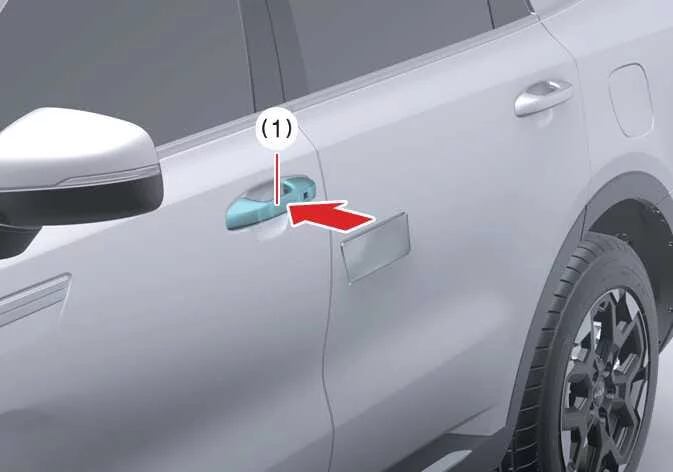
The registered NFC card key allows keyless vehicle access and engine activation without relying on a smartphone battery. Simply tap the card key against the exterior door handle authentication pad to lock or unlock your Kia Sorento, or place it on the wireless charging tray to enable drive authorization.
|
|
Locking and Unlocking the Doors
-
Hold the central NFC antenna area of your registered card key flat against the driver or front passenger exterior door handle authentication pad (1) for more than 2 seconds to cycle door locks.
-
Always verify visual or audible lock confirmation. Unlocked doors automatically relock after 30 seconds if no doors are opened.
-
For consistent response, ensure the precise center of your NFC card key makes direct contact with the touch-sensitive target zone on the exterior handle.
NOTE
The Kia Sorento exterior door lock sensors will not engage and will sound an alert chime upon NFC contact under the following conditions:
A physical smart key fob is detected inside the vehicle cabin.
The vehicle power mode is set to ACC or ON state.
Any side door, the engine hood, or the rear power liftgate remains open or unlatched.
Starting the Vehicle
To start the engine using your Digital Key 2 card key, place the card flat on the wireless charging tray, depress the foot brake pedal, and press the ENGINE START/STOP button.
-
Once the engine is running and drive status is engaged, you may remove the card key from the charging tray and store it safely in your wallet or pocket.
For complete engine operation guidelines, refer to the ENGINE START/STOP Button operating section.
WARNING
Leaving an authorized NFC card key resting on the active wireless charging tray allows immediate engine startup. Never leave children or unauthorized individuals unattended inside your Kia Sorento cabin. To guard against accidental movement or vehicle theft, always carry your card key with you whenever you step away from the vehicle.
NOTE
The NFC card key may fail to transmit properly under these conditions:
The card key is misaligned or shifted away from the central touch point on the door handle or wireless charging tray.
The card is stacked together with active RFID or NFC products, such as contactless payment credit cards or active smartphones.
If reader response fails, lift the card approximately 4 inches (10 cm) away from the sensor pad surface for a moment, then re-apply it flat against the touch target.
Internal antenna loops can fracture under structural bending or severe impacts. Handle the card key carefully; physical damage requires full replacement and re-registration.
Loss or mechanical damage to your card key is not covered under standard manufacturer warranty terms. Replacement costs are the vehicle owner's responsibility.
Exposing the card key to extreme heat environments—such as direct sunlight on top of the dashboard—can warp the plastic body and damage internal circuits. Avoid high-temperature exposure.
Leaving the card key on the wireless charging pad during long drives can cause signal interference or card overheating. Always retrieve the card from the charging tray after starting your Kia Sorento.
Do not place the card key sandwiched between the wireless charging pad and a smartphone during wireless phone charging, as concentrated inductive heat can damage your card key hardware.
How to delete Digital Key 2 (card key)
- Power ON your Kia Sorento ignition while keeping the registered physical smart key inside the passenger cabin. The smart key must remain inside the vehicle throughout the key deletion sequence to authorize security access.
-
With the ignition active, place your physical card key directly onto the designated in-vehicle authentication pad (wireless charging tray). On the central touchscreen interface of your Kia Sorento, tap Setup > Vehicle > Digital key > NFC card key > Delete.
The Delete menu option will appear grayed out and remain non-selectable if there is no active card key currently paired with your Kia Sorento software.
-
Digital key
-
NFC card key
-
Enable Card Key
-
Delete
Once you successfully delete the card key, a visual confirmation pop-up message will display across the infotainment screen or main instrument cluster.
TIP
Infotainment screen structures, menu options, and feature pathways may change following periodic software updates in your Kia Sorento. For additional details, consult the digital user's manual accessible directly through your vehicle's infotainment display system.
-
 How to Delete Digital Key 2 (Smartphone Keys)
To safely delete or revoke smartphone digital key access from your Kia Sorento system memory, launch the vehicle
using your primary physical smart key fob. Keep the smart key inside the passenger ...
See also:
Deactivating ISG
To turn off the ISG system manually, press ...
Limitations of Smart Cruise Control
Advanced driver assistance features are designed to enhance your journey, but the Smart Cruise Control system in your
Kia Sorento may occasionally operate abnormally or unexpectedly under certain ...