
 Kia Sorento: Digital center mirror: (if equipped)
The advanced digital center mirror system integrated into your Kia Sorento utilizes the vehicle’s high-resolution rear-facing camera to capture live traffic feeds and project a crisp, wide-angle image directly onto the integrated mirror display screen. This sophisticated digital center mirror ensures consistently clear rear visibility by empowering the driver to effortlessly monitor trailing traffic despite physical obstructions inside the cabin, such as tall rear passenger headrests, bulky cargo items, or fully loaded luggage compartments.
CAUTION
-
Failure to follow the critical safety warnings and established instructions for the proper utilization of the digital center mirror system could potentially result in a serious vehicular accident.
-
The digital center mirror is designed strictly as an advanced convenience feature and must never serve as a substitute for attentive, proper vehicle operation and direct visual checks. The technology inherently possesses specific peripheral viewing angles where objects cannot be captured or displayed. Always perform physical checks of your blind spots around the Kia Sorento before initiating any vehicle maneuvers. The driver maintains absolute, continuous legal responsibility for safe driving at all times.
-
Never attempt to adjust or operate the detailed settings of the digital center mirror while the vehicle is actively in motion on the road. Interacting with the menu controls while driving introduces severe cognitive and visual distractions, which can cause an immediate loss of control over your Kia Sorento, leading to a collision or serious personal injury.
-
Never attempt to independently disassemble, modify, or tamper with the digital center mirror housing, internal camera unit, or associated wiring harnesses. Such unauthorized interventions may result in electrical short circuits, an unexpected accident, or vehicle fire. If you ever notice unusual smoke, sparks, or a burning odor emanating from the digital center mirror assembly, immediately cease using the system and have it thoroughly inspected by an authorized Kia dealer.
-
NOTE
-
Be sure to properly calibrate and adjust the digital center mirror before setting your Kia Sorento in motion.
-
Switch the system manually into the conventional optical rearview mirror mode while ensuring you are securely and comfortably seated in the driver’s seat. Afterward, physically adjust the mirror housing so that you have an unobstructed, clear field of vision looking outside through the rear window.
-
Push the lower toggle lever all the way to engage the digital mirror mode and fine-tune your preferred display settings. Operating the vehicle without initially adjusting the mirror angle may cause significant viewing difficulties in digital camera mode due to undesirable ambient reflections bouncing off the glass surface of the mirror.
-
-
If the digital center mirror system encounters an unexpected technical malfunction during your journey, immediately switch the system back to the conventional rearview mirror mode for safe driving.
-
Direct blinding sunlight or intense high-beam headlamps from trailing vehicles traveling behind your Kia Sorento may occasionally reflect harshly onto the screen. Switch the system to the conventional optical rearview mirror mode whenever external glare compromises display clarity.
-
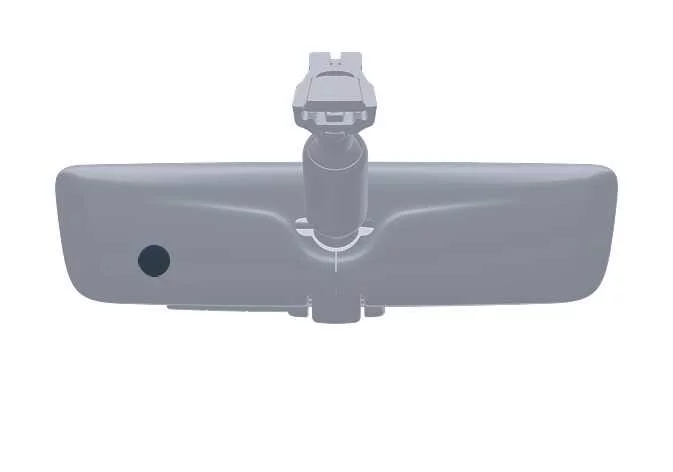
If the exterior rear camera lens (1) accumulates dirt, mud, or road salt, the resulting display image may appear blurred or unclear. Clean the camera optics gently using a soft microfiber cloth or a cotton swab lightly dampened with clean water.

-
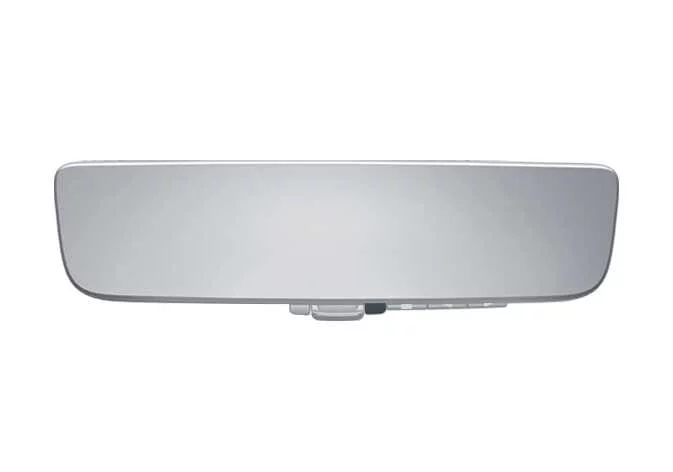
Rear camera lens component
-
System components
|
|
-
Camera indicator light
Illuminates to confirm that the rear camera system is powered and operating normally.
-
HomeLink® control buttons
Programmable buttons designated for the operation of the integrated HomeLink® Universal Transceiver garage door and gate system.
-
Icon display area
Visual user interface zone that renders functional icons while adjusting screen brightness levels and vertical display tilt.
-
Control lever
Manual mechanical toggle operated to seamlessly shift between the digital camera display mode and the standard optical mirror mode.
-
Menu button
Press to illuminate the on-screen icon display area and cycle through adjustable parameters such as display brightness and screen tilt.
-
Select and adjust buttons
Dedicated control buttons pressed to modify the configuration values of your selected display item.
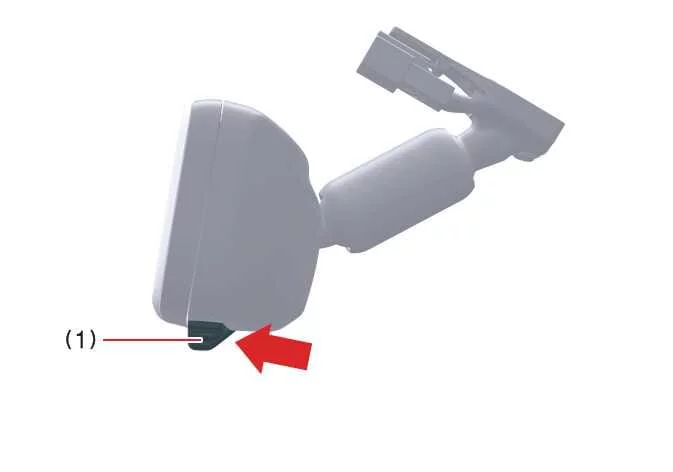
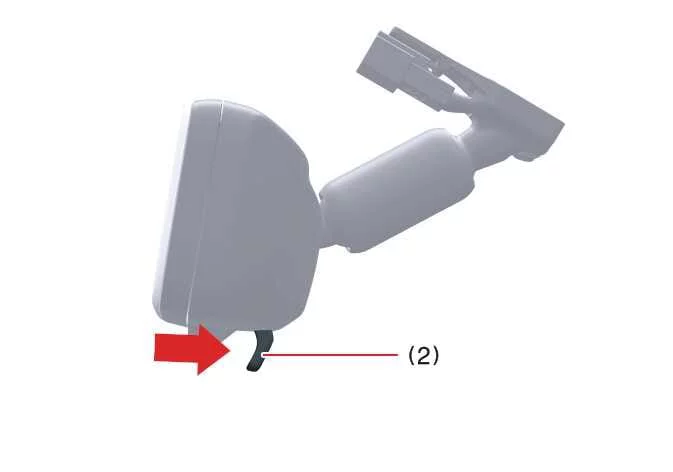
How to change the mode
You can effortlessly toggle and change the mirror operating mode whenever the vehicle ignition switch is placed in the ON position.
|
|
-
Pull the mode select lever downward toward yourself to completely switch your Kia Sorento mirror into digital center mirror mode (1), activating the live rear camera view.
This action projects a clear digital video feed of the traffic zone directly behind the vehicle. When active in this mode, the active camera status indicator illuminates on the glass surface.
-
Push the mode select lever forward away from yourself to completely switch back to optical inside rearview mirror mode (2).
This cuts power to the digital display screen, turning off the video feed and allowing the unit to function entirely as a traditional optical glass mirror.
Adjusting the mirror height
|
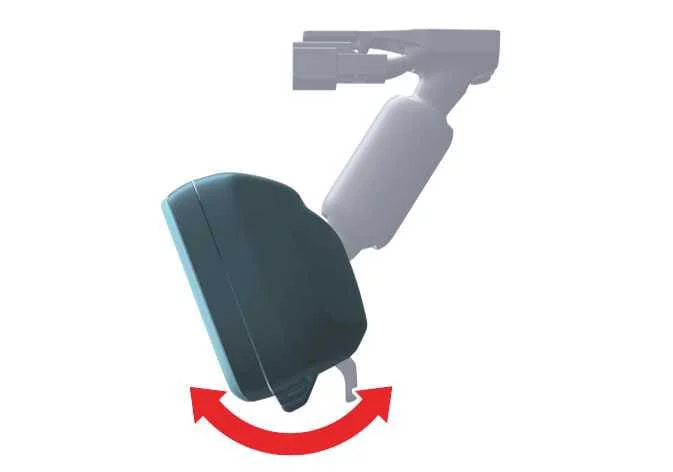
You can easily adjust the physical mounting height and orientation of the rearview mirror assembly to perfectly suit your personal seating posture and height preferences.
Switch the assembly to standard optical mirror mode and gently physical adjust the rearview mirror angle by tilting the entire casing upward or downward as needed.
Display settings (digital mirror mode)
|
-
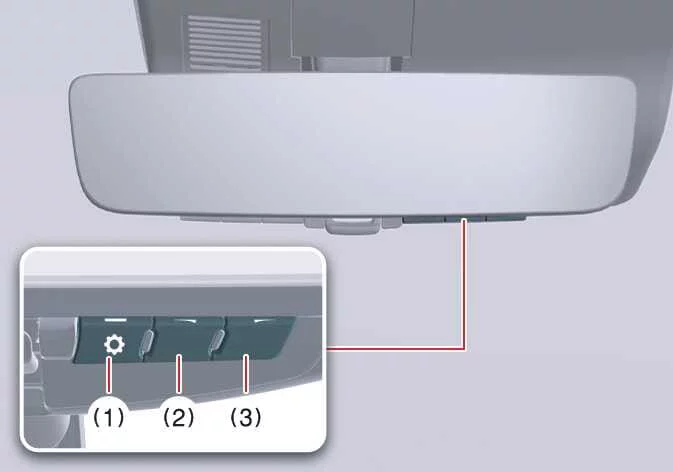
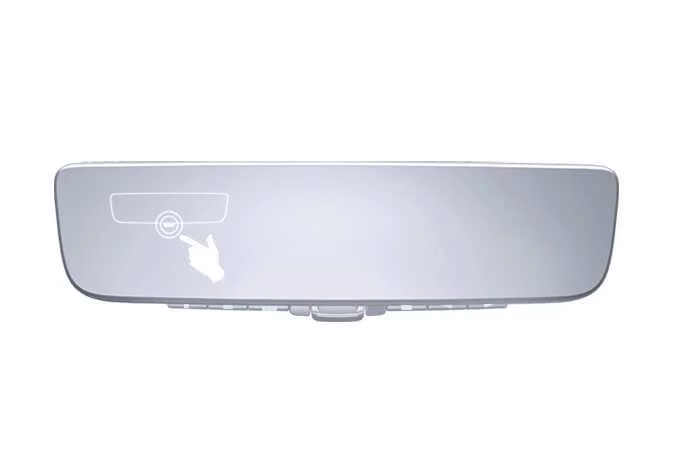
Press the menu button (1) once to wake up the system. The interactive configuration icons will appear on the display screen.
Icons
Settings

Select this option to adjust the display panel brightness level for optimal visibility under varying lighting conditions.

Select this option to physically shift or tilt the digital camera viewing angle upward or downward.
-
Press the main menu button (1) repeatedly to cycle through and highlight the specific parameter you wish to modify.
-
Press button (2) or button (3) to fine-tune and change the selected setting value to your preference.
The on-screen configuration icons will automatically disappear if no control buttons are pressed for approximately 5 seconds or longer.
Setting the display panel brightness of the digital center mirror to an excessively high level during nighttime driving may cause unnecessary eye strain and visual fatigue.
Always adjust your Kia Sorento digital mirror to an appropriate, comfortable brightness level. If your eyes begin to feel tired from screen glare, switch the unit immediately to traditional optical mirror mode.
|
|
To prevent the built-in ambient light sensors from experiencing performance malfunctions or miscalculating cabin lighting, do not touch, obstruct, or cover them with stickers or accessories.
Digital mirror mode operating conditions
The digital mirror display mode remains fully operational whenever the vehicle ENGINE START/STOP ignition button is engaged in the ON position. When you transition the ignition switch back to the LOCK/OFF or accessory (ACC) position, the live rearview camera video stream will automatically turn off and disappear.
When using the digital center mirror in digital mirror mode
-
When the rear trunk liftgate is left open or ajar, the digital center mirror video feed may fail to display correctly or show a distorted angle. Always verify that the liftgate is securely closed before driving your Kia Sorento.
-
If the digital screen becomes difficult to see clearly due to bright sunlight entering the cabin, pull closed the sunshade on the panoramic sunroof (if equipped).
-
Any of the following minor visual phenomena may occur when driving during nighttime hours and do not signify that a hardware malfunction has taken place:
-
The perceived color tones of objects or vehicles in the displayed camera feed may differ slightly from their true daylight colors due to low-light amplification.
-
Depending on your individual physical vision, eye accommodation speed, or age, it may take your eyes slightly longer than usual to focus on a digital screen compared to an analog mirror. If this causes discomfort, switch back to optical mirror mode.
-
Do not allow vehicle passengers to stare continuously at the active digital screen while the vehicle is in motion, as prolonged close focus on moving video displays can occasionally trigger motion sickness.
-
When the system malfunctions
|
If the diagnostic system symbol shown in the illustration appears on-screen while utilizing the digital center mirror mode, a temporary or permanent system malfunction has been detected. The warning symbol will typically fade away within a few seconds. Switch your mirror immediately to conventional optical mirror mode and schedule an appointment to have your Kia Sorento inspected by an authorized Kia service dealer.
NOTE
-
To prevent permanent chemical damage or surface delamination on your digital center mirror, avoid using harsh industrial cleaning detergents such as paint thinner, benzene, or concentrated alcohol. These solvents will discolor, deteriorate, or ruin the specialized mirror and display surface.
-
Never attempt to remove, disassemble, or alter the internal components of the rearview mirror housing or external camera module.
-
Do not allow harsh organic chemical solvents, automotive car wax, windshield washer additives, or glass ceramic coatings to come into direct contact with the camera lens. If accidental exposure occurs, wipe the substance off immediately using a clean cloth.
-
When cleaning the exterior camera lens, wipe it delicately using a damp, soft cloth. Never scrub or rub the delicate camera lens aggressively with abrasive force, as scratching the glass will permanently ruin its ability to capture sharp, clear images.
-
Protect the camera housing from enduring heavy mechanical impacts or physical shocks, as sharp blows can knock the optics out of alignment or cause an internal electrical failure. If an impact occurs, have your vehicle checked by an authorized Kia technician as soon as possible.
-
Leaving the electronic mirror system powered on for extended periods while the vehicle engine is turned off (ON position without running) can gradually drain and discharge the vehicle battery.
-
Do not mount external aftermarket radio antennas, transceivers, or high-power wireless gadgets directly next to the digital center mirror unit. Strong electromagnetic radio frequency waves emitted from unsecured wireless devices can interfere with internal circuits, causing rolling lines or distorted video feeds on your Kia Sorento display.
-
Avoid pressing the control buttons excessively hard or manipulating the manual toggle lever with rough, aggressive force. Excessive physical abuse can induce mechanical failure or cause the mirror assembly to loosen from its windshield mount.
-
Never rotate the main body of the digital center mirror by 90 degrees or more laterally. Forcing the housing beyond its designated motion limits will permanently snap internal mounts and damage the electronic assembly. Avoid subjecting the mirror body to violent mechanical shocks.
-
If harsh external glare or blinding background light makes it difficult to read the digital center mirror display screen clearly, instantly switch your Kia Sorento back to conventional optical rearview mirror mode for a safer, glare-free view.
Digital center mirror error icon and solutions
|
Symptom |
Likely cause |
Solution |
|---|---|---|
|
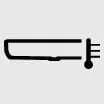
The high temperature warning icon ( |
The internal temperature of the digital center mirror hardware has exceeded normal operating limits due to intense cabin heat or direct sunlight. Under this condition, the display panel will automatically and gradually dim its backlight. If internal heat levels continue to rise unchecked, the digital mirror system will temporarily shut down to protect its circuits. |
To help reduce the operating temperature of the mirror unit, lower the overall climate control temperature inside your Kia Sorento cabin. The warning icon will automatically extinguish once the internal components cool down. If the temperature warning icon fails to disappear even after the cabin and mirror have completely cooled, take your vehicle to an authorized Kia dealer for diagnostic inspection. |
|
The normal display status icon ( |
The internal electronic control module has encountered a fault, indicating that the digital camera or mirror display system is experiencing a component malfunction. |
Manually switch the assembly to traditional optical mirror mode and promptly have your vehicle inspected by a qualified technician at an authorized Kia dealership service center. |
 )
illuminates on the
right side of the display screen.
)
illuminates on the
right side of the display screen. )
has unexpectedly switched
over to display a persistent system error warning icon (
)
has unexpectedly switched
over to display a persistent system error warning icon ( ).
).
 Outside rearview mirror
Your Kia Sorento is equipped with both left and right outside rearview mirrors designed to provide optimal visibility
and safety on the road.
Be sure to thoroughly check and adjust the mirror an ...
See also:
Rear Driveshaft Inspection
1.
Check the driveshaft boots for damage and deterioration.
2.
Check the ball joint for wear and damage.
3.
Che ...
Instrument cluster
1. Tachometer
2. Speedometer
3. Engine coolant temperature gauge
4. Fuel gauge
5. LCD display
6.Warning and indicator lights (if equipped)
7. Turn signal indicator lights
Instrument Cluster ...
Room Lamp Inspection
1.
Remove the room lamp assembly then check for continuity between
terminals.
[Sunroof]
[General]
...