
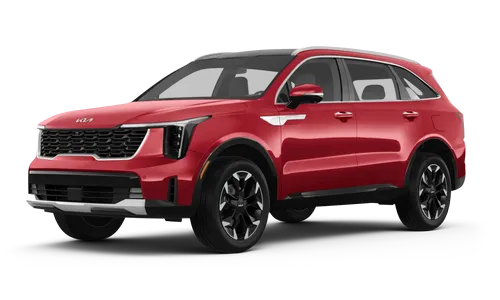
 Kia Sorento: Wireless Charging Unit Description and Operation
Kia Sorento (MQ4, 2021-2026) Service Manual / Body Electrical System / Charging System / Wireless Charging Unit Description and Operation
| Description |
During IG ON, battery voltage is supplied to the wireless power charger system to transmit an output of 5 W to
mobile phone.
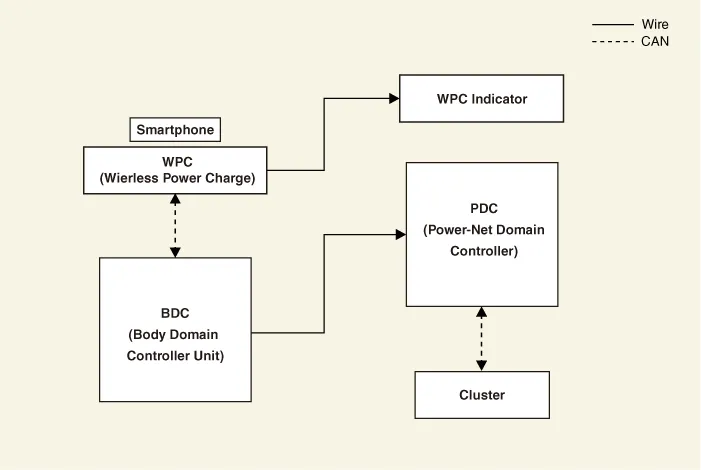
Schematic Diagram
| – |
Wireless power charger (WPC) : Negligence of mobile phone, foreign object detection (FOD) decision.
|
| – |
Body domain control unit : Charging stops when LF (FOB key search) is driven
|
| – |
Wireless charging indicator : Displays the charging status.
|
| – |
Instrument cluster : Alerts about contact with mobile phone.
|
Wireless Power Charger System Major Functions
| 1. |
Charging Function
|
| 2. |
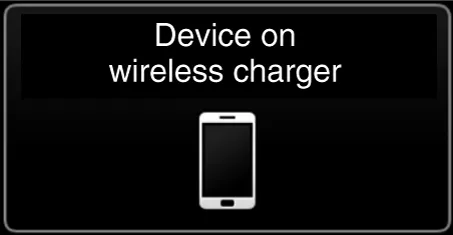
Mobile phone neglect alert function
|
| 3. |
Overheating prevention
|

| 4. |
Foreign matter detection
|

| 5. |
Body domain control unit LF frequency interference prevention function
To avoid interference between the wireless charging frequency and the body domain control unit frequency
band.
|
| 6. |
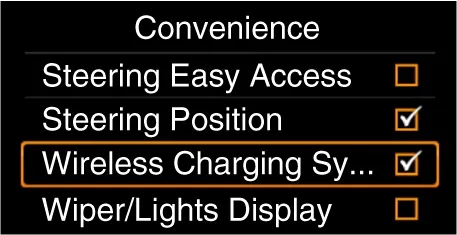
Turn the wireless charging function ON/OFF with USM.
|
Wireless Power Charger (WPC) System Protection
| Item |
Condition |
State |
| Protects against low/high voltage |
Protects and stops charging under 8.5 V and over 16.5 V |
LED OFF (Stops operation) |
| Charges between 9 - 16 volts |
||
| Protects against reverse voltage |
Protects and stops charging in case of reverse voltage |
LED OFF (Stops operation) |
| Protects against overcurrent |
Protects and stops charging in case of detecting 4 amps |
Amber LED blinks |
| Protects against overheating |
Protects and stops charging in case of detecting 158 °F (70 °C) by internal temperature
sensor of wireless charging module |
Amber LED blinks |
| Resumes under 149 °F (65°C) |
||
| Foreign substances (Coins, clips, precious metals, etc.) |
Protects and stops charging in case of detecting foreign matter (overheating
prevention) |
Amber LED blinks |
| Prevents frequency interference |
Protects and stops charging by activating IBU in case door or tailgate is open |
LED OFF (Stops operation) |
| Resumes in 3.5 seconds after all doors and tailgate are closed and IBU operation is
completed |
||
| Mobile phone neglect alert function |
In case of smart phone on the charging pad when opening the door after IG OFF. |
Displays warning message on the instrument panel (for about 4 - 5 seconds) |
Removal
Rear Console Cover
1.
Remove the floor console assembly.
(Refer to Body - “Floor Console Assembly”)
...
 USB Charger Repair Procedures
Wireless Charging Unit On Vehicle Inspection
On Vehicle Inspection
Diagnostic with KDS
1.
The wireless ...
 Wireless Charging Unit On Vehicle Inspection. Wireless Charging Unit Repair Procedures
See also:
4WD ECU Installation
1.
Install in the reverse order of removal.
2.
Prior to installing a new ECU, upload the original ECU ...
Suspension Ball Joints Repair procedures. Suspension Mounting Bolts Repair procedures
Suspension Ball Joints Repair procedures
Inspection
Visually check, must be free from injurious flaw and crack.
Suspension Mounting Bolts Repair procedures
...
Lubricant
Lubricant
Item
Capacity
Recommended
ATF (Automatic Transaxle Fluid)
...
Manuals list
- Kia Sorento MQ4 2021-2026 Owners Manual
- Kia Sorento XM 2011-2015 Owners Manual
- Kia Sorento XM 2011-2015 Service Manual

Copyright © www.ksmanual.com 2014-2026 - 0.0527