
 Kia Sorento: Rear View Monitor operation
Parking/View button

|
(1) Parking/View button
To turn the Rear View Monitor ON instantly while maneuvering your Kia Sorento, simply press the physical Parking/View button (1) located on your center console.
To turn the Rear View Monitor OFF before reaching your standard disengagement threshold, press the Parking/View button (1) a second time.
Rear view
|
|
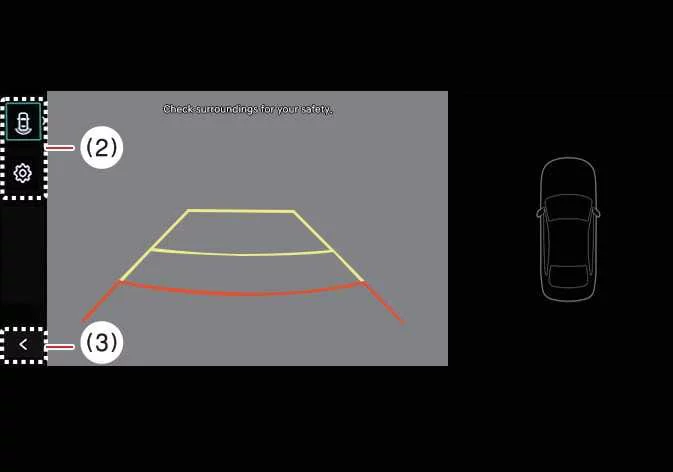
(2) View switching button
(3) back button
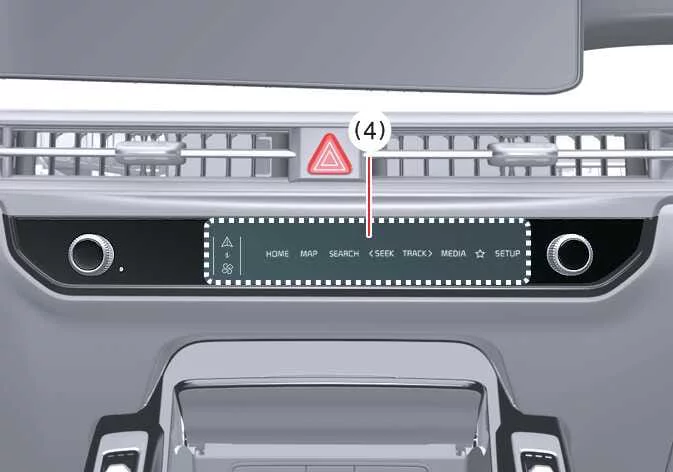
(4) infotainment system operation button
Operating conditions
The Rear View feed activates automatically on your Kia Sorento dashboard under specific operating conditions:
-
You shift the transmission gear selector into R (Reverse).
-
You press the dedicated Parking/View button (1) while the gear shift is positioned in P (Park) or N (Neutral). If the vehicle is currently in N (Neutral), your vehicle speed must remain lower than 6 mph (10 km/h) to safely operate the Rear View function.
To cycle between different perspectives such as Rear Top View, standard Rear View, or Rear Wide View on your display, press the View switching button (2) directly on the Rear Top View screen.
Non-operating conditions
The Rear View display will automatically turn OFF when you are parking or finishing a maneuver under these conditions:
-
You shift the transmission gear selector into P (Park).
-
You press the physical Parking/View button (1).
-
You tap the software back button (3) on the active Rear View Monitor touchscreen interface.
-
You press any primary infotainment system operation button (4) to switch to navigation, media, or home menus.
-
The transmission is in N (Neutral) or D (Drive) and your vehicle acceleration carries you above 6 mph (10 km/h).
When your Kia Sorento transmission gear selector is actively engaged in R (Reverse), the Rear View camera feed will remain turned ON continuously, regardless of secondary view selections.
Extended Rear View Monitor
To help you park safely and execute complex garage entries, the Extended Rear View Monitor function maintains the active Rear View camera display on your screen even after you shift your Kia Sorento transmission from R (Reverse) into N (Neutral) or D (Drive).
Operating conditions
The Extended Rear View Monitor system functions seamlessly whenever you shift from R (Reverse) into N (Neutral) or D (Drive) while your vehicle speed stays below the safety threshold of 6 mph (10 km/h).
Non-operating conditions
The Extended Rear View Monitor function will automatically switch OFF under the following operational circumstances:
-
You shift your transmission gear into P (Park).
-
You press the physical Parking/View button (1).
-
You tap the software back button (3) located on the Rear View Monitor display interface.
-
You press an infotainment system operation button (4) to access other vehicle controls.
-
Your Kia Sorento vehicle speed exceeds 6 mph (10 km/h) while moving forward.
Rear Top View
|
|

|
(2) View switching button
(3) back button
(4) infotainment system operation button
The Rear Top View feature synthesizes a comprehensive 360-degree perspective of your Kia Sorento from above, making it significantly easier to judge spatial clearances between your SUV and adjacent parked cars, walls, or low obstacles.
To bring up the Rear Top View instantly, press the designated Rear Top View button on your screen.
The Rear View camera video will not turn OFF as long as your gear selector remains in Reverse (R), giving you uninterrupted visibility regardless of which secondary display mode you choose.
Both the standard Rear View and Rear Top View modes can superimpose helpful Rear Parking Guidelines onto your screen. To enable these, tap Setup > Vehicle > Driver Assistance > Parking Safety > Camera Settings > Display Information > Rear Parking Guidelines on your Kia Sorento touchscreen menu. Note that these specific guidelines do not appear on the raw Rear View feed during active parking rolling.
See also:
Components Location
1. Engine Control Module (ECM)
2. Manifold Absolute Pressure Sensor (MAPS)
3. Intake Air Temperature Sensor (IATS)
4. Engine Coolant Temperature Sensor (ECTS)
5. Throttle Positi ...
Fuel Filter Installation
1.
Install in the reverse order of removal.
...
Rear wheel alignment
When using a commercially available computerized wheel alignment
equipment to inspect the rear wheel alignment, always p ...