
 Kia Sorento: Overview
Description
The trip computer is a microcomputer- controlled driver information system that displays information related to driving.
✽ NOTICE
Some driving information stored in the trip computer (for example Average Vehicle Speed) resets if the battery is disconnected.
Trip Modes (Type A)
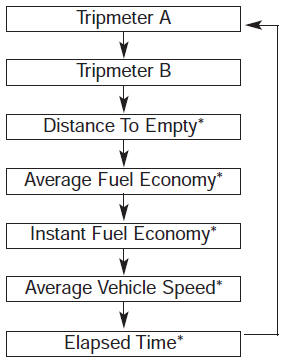
To change the trip mode, press the TRIP button 
.
Trip Modes (Type B)
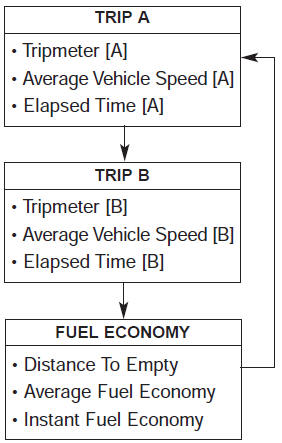
To change the trip mode, press the MOVE button
 .
.
Trip A/B
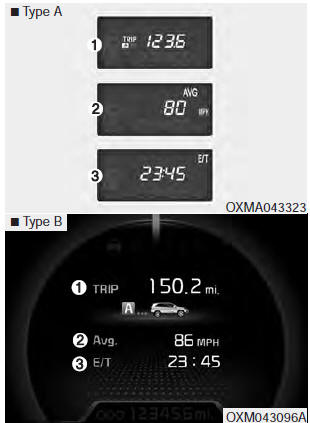
Tripmeter (1)
- The tripmeter is the total driving distance since the last tripmeter reset. Distance range: 0.0 ~ 9999.9 mi. or km
- To reset the tripmeter, press the RESET button
 on the steering
wheel for more than 1 second when the tripmeter is displayed.
Average Vehicle Speed (2)
- The average vehicle speed is calculated by the total driving distance and driving time since the last average vehicle speed reset. Speed range: 0 ~ 999 MPH or km/h
- To reset the average vehicle speed, press the RESET button
 on the steering
wheel for more than 1 second when the average vehicle speed is displayed.
✽ NOTICE
- The average vehicle speed is not displayed if the driving distance is less than 0.03 miles (50 meters) or the driving time is less than 10 seconds since the ignition switch or Engine Start/Stop button is turned to ON.
- Even if the vehicle is not in motion, the average vehicle speed keeps going while the engine is running.
Elapsed Time (3)
- The elapsed time is the total driving time since the last elapsed time reset.Time range (hh:mm): 00:00 ~ 99:59
- To reset the elapsed time, press the RESET button
 on the steering wheel for
more than 1 second when the elapsed time is displayed.
✽ NOTICE
Even if the vehicle is not in motion, the elapsed time keeps going while the engine is running.
Fuel Economy
Distance To Empty (1)
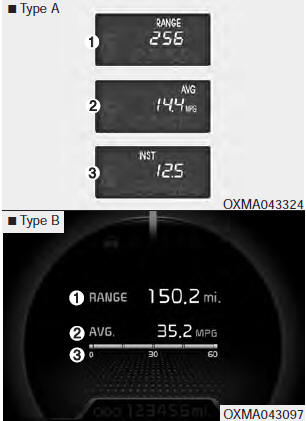
The distance to empty is the estimated distance the vehicle can be driven with the remaining fuel.
Distance range : 30 ~ 9999 mi or 50 ~ 9999 km.
If the estimated distance is below 30 mi. (50 km), the trip computer will display “---” as distance to empty.
✽ NOTICE
- If the vehicle is not on level ground or the battery power has been interrupted, the distance to empty function may not operate correctly.
- The distance to empty may differ from the actual driving distance as it is an estimate of the available driving distance.
- The trip computer may not register additional fuel if less than 6 liters (1.6 gallons) of fuel are added to the vehicle.
- The fuel economy and distance to empty may vary significantly based on driving conditions, driving habits, and condition of the vehicle.
Average Fuel Economy (2)
- The average fuel economy is calculated by the total driving distance and fuel consumption since the last average fuel economy reset. Fuel economy range: 0.0 ~ 99.9 MPG or L/100km
- The average fuel economy can be reset both manually and automatically.
Manual reset
To clear the average fuel economy manually, press the RESET button
 on the steering wheel for more
than 1 second when the average fuel economy is displayed.
Automatic reset
To make the average fuel economy be reset automatically whenever refueling, select the “Auto Reset” mode in User Setting menu of the LCD display (Refer to “LCD Display”).
Under “Auto Reset” mode, the average fuel economy will be cleared to zero (---) when the vehicle speed exceeds 1 km/h after refueling more than 1.6 gallons (6 liters).
✽ NOTICE
The average fuel economy is not displayed for more accurate calculation if the vehicle does not drive more than 10 seconds or 0.03 miles (50 meters) since the ignition switch or Engine Start/Stop button is turned to ON.
Instant Fuel Economy (3)
This mode displays the instant fuel economy during the last few seconds when the vehicle speed is more than 6.2 MPH (10 km/h).
Fuel economy range: 0 ~ 50 MPG or 0 ~ 30 L/100km
 Trip computer
...

See also:
Specification
Items
Inner side
Outer side
Front driveshaft
2.4GDI M/T
Joint type
LSJ 104
UBJ 104
Max. permissible angle
23°
...
Hands Free Switch Inspection
1.
Check the handsfree remote control switch for resistance between
No.2 and No.5 terminals in each switch position.
[Call + Hang Up]
Switch
...
Blind Spot Detection Switch Installation
1.
Install the crash pad side switch assembly after connecting the
connector.
2.
Install the crash pad lower panel.
...
Categories
- Home
- First Generation
- Second Generation
- Kia Sorento XM 2011-2026 Owners Manual
- Kia Sorento XM 2011-2026 Service Manual
