
 Kia Sorento Mechanical Key Emergency Access
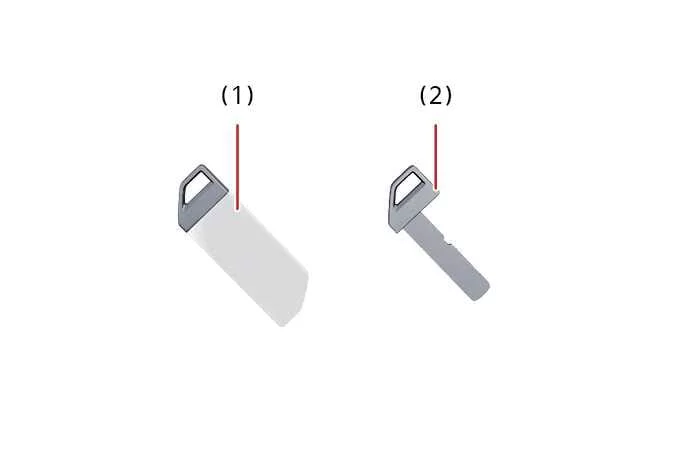
Should your Kia Sorento key fob battery become fully discharged or the key fob encounter operational interference, you can still seamlessly gain access to your vehicle. Unlocking or locking the vehicle doors under these conditions is easily accomplished by utilizing the built-in mechanical key emergency blade (2).
|
|
To access and extract the emergency mechanical key, gently slide and detach the protective key release cover (1) located on your Kia Sorento smart key casing.
Kia Sorento Smart Key Operating Precautions & Signal Interference
Under specific environmental conditions, your Kia Sorento key fob proximity sensor or remote locking transmission may experience temporary signal obstruction. Expect potential operational delays or unresponsiveness if:
-
The Kia Sorento smart key is in close proximity to high-frequency radio transmitters, commercial broadcast towers, radar installations, or airport navigation towers that generate intense electromagnetic activity.
-
The key fob is positioned near operational mobile two-way radio equipment or high-power CB radio transceivers.
-
The key unit is kept right next to an active mobile phone, particularly during active voice calls, cellular data transfers, or background messaging synchronization. To ensure uninterrupted signal transmission, avoid stowing the Kia Sorento key fob in the immediate vicinity of mobile devices.
-
Another vehicle's electronic key fob system is being actively operated in close proximity to your Kia Sorento, causing temporary radio frequency overlap.
If your Kia Sorento remote key fob fails to unlock or lock the doors, test your registered spare key fob or manually open the driver's door using the physical mechanical key. Should electronic key malfunction persist, contact your authorized Kia dealer service center for diagnosis and fob reprogramming.
When positioned right beside a smartphone or mobile device, cellular signals can block the low-power frequency emitted by the Kia Sorento key fob transmitter. Interference is particularly pronounced when smartphones actively make calls, exchange messages, or process background application data. We recommend keeping your Kia Sorento key fob and smartphone in separate pockets or bag compartments to maintain adequate physical separation.
To conserve internal battery power, your Kia Sorento smart key features an automated motion-idle sleep mode. If left undisturbed on a flat surface for an extended period, the smart key proximity detection function temporarily pauses. Simply lifting or moving the key instantly reactivates full proximity functionality.
NOTE
Lost Kia Sorento Smart Keys
A maximum of 2 individual smart keys can be registered and paired to a single Kia Sorento vehicle security system at any given time.
If both registered smart key fobs are lost or stolen, engine start capabilities will be completely disabled for security reasons. Contact an authorized Kia dealer dealership service department immediately to re-key and program a new key set. If necessary, arrange towing services to transfer your vehicle safely and prevent potential theft risks.
NOTE
Kia Sorento Key Fob Fluid Exposure
Always protect the transmitter unit from moisture, high humidity, and direct contact with liquids. Water ingress can short-circuit internal printed circuit boards and permanently damage remote locking functions.
NOTE
To prevent electronic component degradation and internal magnetic corruption of the Kia Sorento key fob microchip, avoid storing or leaving the key near household electrical appliances such as:
Television sets and monitor displays
Personal computers, laptops, and external hard drives
Smartphones, wireless cordless landline phones, and inductive battery charging pads
LED desk lamps and unshielded transformers
Induction cooktops and magnetic kitchen appliances
When entrusting your vehicle to valet parking services or service technicians, remove the physical emergency mechanical key blade for your personal possession and provide only the main smart key fob unit.
When boarding an aircraft with your Kia Sorento smart key in your carry-on luggage or pocket, take care to avoid pressing any remote control buttons inside the cabin. Store the key securely so that lock, unlock, or trunk release buttons cannot be accidentally compressed, as active radio transmissions could interfere with flight communication systems.
Physical damage, liquid ingress, or electronic failure resulting from improper handling, immersion, or unauthorized dismantling is not covered under the official Kia Sorento vehicle manufacturer warranty.
 Smart key
Equipped with modern proximity sensor technology, the Kia Sorento smart key allows you to lock, unlock, or start your
vehicle effortlessly without removing the fob from your pocket or bag.
...
 FCC Compliance and Regulatory Information for Kia Sorento Electronic Systems
This remote key fob device strictly complies with Part 15 of the Federal Communications Commission (FCC) regulatory
rules.
Operation of this equipment is governed by the following two regulato ...
See also:
Electronic Stability Control (ESC) system
The Electronic Stability Control (ESC) system integrated into your Kia Sorento is designed to actively stabilize your
vehicle during cornering maneuvers to mitigate the risk of losing control and ...
Front Disc Brake Installation
1.
Installation is the reverse of removal.
2.
Compress the piston into the caliper body using the SST (09581-11000).
...
Head Lamps Replacement
Bulb (HID)
1.
Turn the head lamp switch off.
2.
Disconnect the power connector from the lamp.
3.
Remove the ...