
 Kia Sorento: High Beam Assist (HBA)
|
The HBA function automatically adjusts the headlight range (switches between high beam and low beam) depending on the brightness of detected vehicles and certain road conditions.
Detection sensor
Please refer to Detecting sensor(s) for the applicable sensors and their locations.
TIP
-
Always keep the front view camera in good condition to maintain optimal performance of High Beam Assist.
-
For more information about the front view camera, refer to Forward Collision-Avoidance Assist (FCA) (Sensor Fusion).
High Beam Assist (HBA) setting

|
|
With the ENGINE START/STOP button ON, navigate through the infotainment setup by selecting Setup > Vehicle > Lights > High Beam Assist on your Kia Sorento to seamlessly activate the intelligent High Beam Assist function for effortless nighttime driving.
WARNING
For your safety, change the settings only after parking the vehicle at a safe location.
High Beam Assist (HBA) operation
-
After selecting High Beam Assist in the Settings menu, the advanced lighting system on your Kia Sorento operates through a precise sequence:
-
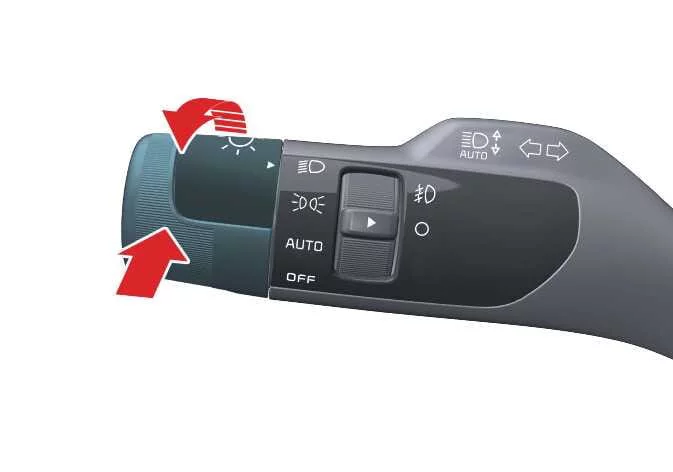
To enable the function, set the headlight switch to AUTO and push the headlamp lever toward the instrument cluster. The HBA (
) indicator light will
appear on the
instrument cluster. -
When HBA is enabled, the high beam will automatically engage when the vehicle speed exceeds 20 mph (30 km/h). Conversely, the high beam will not turn on when the vehicle speed drops below 12 mph (20km/h).
-
The high beam (
 ) indicator
light will
illuminate on the cluster whenever the high beams are actively projecting.
) indicator
light will
illuminate on the cluster whenever the high beams are actively projecting.
-
-
If you choose to use the headlight lever or switch while HBA is actively operating, the system responds dynamically according to your inputs:
-
To turn the high beam on temporarily without canceling HBA, pull the headlight lever toward you when the high beam is currently off. When you release the lever, it returns to the center position and the high beam deactivates.
-
To turn the high beam on permanently and cancel the automated HBA mode, push the light switch forward toward the instrument cluster.
-
If you manually shift the headlight switch from AUTO to any other lighting setting, HBA will turn off completely and the corresponding manual lamp selection will engage.
-
-
When HBA is actively operating, your Kia Sorento headlights will intelligently switch from high beams to low beams in the following road and traffic situations:
-
When an oncoming vehicle's headlight glare is detected in your field of view.
-
When the rear taillight configuration of a vehicle traveling directly in front of you is detected.
-
When the front headlight or rear taillight of a motorcycle or bicycle is identified ahead.
-
When the surrounding ambient lighting conditions become bright enough that high beams are no longer required.
-
When bright streetlights or other intense municipal lighting sources are detected along your route.
-
High Beam Assist malfunction and limitations
High Beam Assist (HBA) malfunction
|
|
(A) Check Driver Assistance system. |
When HBA is experiencing an operational fault or not working properly, the Master warning light ()
appears on the instrument cluster, accompanied by a diagnostic warning message that remains visible for several
seconds. Promptly have the system inspected by an authorized Kia dealer.
High Beam Assist (HBA) limitations
Your Kia Sorento High Beam Assist may experience reduced performance or temporary limitations in the following challenging driving situations:
-
Light emitted from another road user or vehicle is obscured or not detected for any reason.
-
The exterior headlight lenses are covered with heavy dust, road salt, snow, or water droplets.
-
The main headlights are turned off while the front fog lights are active.
-
Your vehicle detects an external light source that closely resembles a vehicle headlight configuration.
-
The headlamp assemblies have suffered physical damage or were incorrectly repaired after an incident.
-
The headlamps are misaligned and not aimed properly toward the road ahead.
-
You are navigating along narrow, sharply curved, rough, or extremely steep roadways.
-
You are driving through an intersection or curving section where a vehicle in front is only partially visible.
-
There are overhead traffic lights, highly reflective road signs, flashing construction markers, or roadside mirrors ahead.
-
Temporary reflective cones or unexpected light flashes from a construction zone interfere with the sensor.
-
Adverse weather or road conditions leave surfaces wet, icy, snow-covered, or severely degraded.
-
Another vehicle abruptly appears from around a sudden blind curve.
-
A leading or oncoming vehicle is tilted unusually due to a flat tire or is currently being towed.
-
Light from other vehicles is blocked or heavily diffused by dense exhaust fumes, thick smoke, heavy fog, or blowing snow.
TIP
-
The HBA function is designed strictly as a driving convenience feature and may occasionally fail to switch correctly. It remains the absolute responsibility of the driver to maintain safe driving practices and constantly monitor the road ahead.
-
HBA may temporarily remain inactive for approximately 15 seconds immediately after starting your vehicle or following the initialization or restart of the front view camera.
-
Whenever HBA does not operate under normal parameters, you should manually switch your headlights between high and low beam.
 Front fog light operation: (if equipped)
Fog lights are designed to improve visibility in fog, rain, or snow.
...
See also:
Windshield defrosting and defogging
WARNING - Windshield heating
Do not use the or
position during cooling operation
in extremely humid weather. The difference between the temperature of the outside
air and the windshield could ca ...
Inspection
1.
Turn the ignition switch OFF and disconnect the battery negative
(-) cable.
2.
Disconnect the fuel pressure regulator valve connector.
...
Driver Attention Warning settings. Leading Vehicle Departure Alert
Leading Vehicle Departure Alert
...