
 Kia Sorento: Using the iPod® device
- Some iPod® models may not support communication protocol and files may not properly play. Supported iPod® models: iPhone® 3GS/4 iPod® touch 1st~4th generation iPod® nano 1st~6th generation iPod® classic
- The order of search or playback of songs in the iPod® can be different from the order searched in the audio system.
- If the iPod® is disabled due to its own malfunction, reset the iPod®. (Reset: Refer to iPod® manual)
- An iPod® may not operate normally on low battery.
- Some iPod® devices, such as the iPhone, can be connected through the Bluetooth® Wireless Technology interface. The device must have audio Bluetooth® Wireless Technology capability (such as for stereo headphone Bluetooth® Wireless Technology). The device can play, but it will not be controlled by the audio system.
- To use iPod® features within the audio, use the cable provided upon purchasing an iPod® device.
- Skipping or improper operation may occur depending on the characteristics of your iPod®/iPhone® device.
- If your iPhone® is connected to both the Bluetooth® Wireless Technology and USB, the sound may not be properly played. In your iPhone, select the Dock connector or Bluetooth® Wireless Technology to change the sound output (source).
- When connecting iPod® with the iPod® Power Cable, insert the connector to the multimedia socket completely. If not inserted completely, communications between iPod® and audio may be interrupted.
- When adjusting the sound effects of the iPod® and the audio system, the sound effects of both devices will overlap and might reduce or distort the quality of the sound.
- Deactivate (turn off) the equalizer function of an iPod® when adjusting the audio system’s volume, and turn off the equalizer of the audio system when using the equalizer of an iPod®.
- When not using iPod® with car audio, detach the iPod® cable from iPod®. Otherwise, iPod® may remain in accessory mode, and may not work properly.
Bluetooth® Wireless Technology
Bluetooth® Wireless Technology
The Bluetooth® word mark and logos are registered trademarks owned by Bluetooth SIG, lnc. and any use of such marks by Kia is under license.
A Bluetooth® enabled call phone is required to use Bluetooth® wireless technology.
WARNING
Driving while distracted can result in a loss of vehicle control that may lead to an accident, severe personal injury, and death. The driver’s primary responsibility is in the safe and legal operation of a vehicle, and use of any handheld devices, other equipment, or vehicle systems which take the driver’s eyes, attention and focus away from the safe operation of a vehicle or which are not permissible by law should never be used during operation of the vehicle.
Before Using the Bluetooth® Handsfree
What is Bluetooth® ?
- Bluetooth® refers to a short-distance wireless networking technology which uses a 2.4GHz ~ 2.48GHz frequency to connect various devices within a certain distance.
- Supported within PCs, external devices, Bluetooth® phones, PDAs, various electronic devices, and automotive environments, Bluetooth® allows data to be transmitted at high speeds without having to use a connector cable.
- Bluetooth® Handsfree refers to a device which allows the user to conveniently make phone calls with Bluetooth® mobile phones through the audio system.
- Bluetooth® Handsfree may not be supported in some mobile phones. To learn more about mobile device compatibility, visit www.kia.com.
Precautions for Safe Driving
- Bluetooth® Handsfree is a feature that enables drivers to practice safe driving. Connecting the head unit with a Bluetooth® phone allows the user to conveniently make and receive calls and use contacts. Before using Bluetooth®, carefully read the contents of this user’s manual.
- Excessive use or operations while driving may lead to negligent driving practices and result in accidents. Refrain from excessive operations while driving.
- Viewing the screen for prolonged periods of time is dangerous and may lead to accidents. When driving, view the screen only for short periods of time.
When connecting a Bluetooth® Phone
- Before connecting the head unit with the mobile phone, check to see that the mobile phone supports Bluetooth® features.
- Even if the phone supports Bluetooth®, the phone will not be found during device searches if the phone has been set to hidden state or the Bluetooth® power is turned off. Disable the hidden state or turn on the Bluetooth® power prior to searching/connecting with the Head unit.
- Bluetooth phone is automatically connected when the ignition on.
- If you do not want automatic connection with your Bluetooth® device, turn off the Bluetooth® feature within your mobile phone.
- The Handsfree call volume and quality may differ depending on the mobile phone.
- Park the vehicle when connecting the head unit with the mobile phone.
- Bluetooth® connection may become intermittently disconnected in some mobile phones. Follow these steps to try again. Within the mobile phone, turn the Bluetooth® function off/on and try again.Turn the mobile phone power Off/On and try again. Completely remove the mobile phone battery, reboot, and then again.Reboot the Audio System and try again.Delete all paired devices, pair and try again.
- Handsfree call quality and volume may differ depending on the model of your mobile phone.
Voice Recognition
- When using the voice recognition feature, only commands listed within the user's manual are supported.
- Be aware that during the operation of the voice recognition system, pressing
any key other than the
 key terminate voice recognition
mode. - For superior voice recognition performance, position the microphone used for voice recognition above the head of the driver’s seat and maintain a proper position when saying commands.
- Within the following situations, voice recognition may not function properly due to external sound. When the windows and sunroof are open When the wind of the cooling / heating device is strong When entering and passing through tunnels When driving on rugged and uneven roads During severe rain (heavy rains, windstorms)
- Phone related voice commands can be used only when a Bluetooth® Wireless Technology device is connected.
- When making calls by stating a name, the corresponding contact must be downloaded and stored within the audio system.
- After downloading the Bluetooth® Wireless Technology phone book, it takes some times to convert the phone book data into voice information. During this time, voice recognition may not properly operate.
- Pronounce the voice commands naturally and clearly as if in a normal conversation.
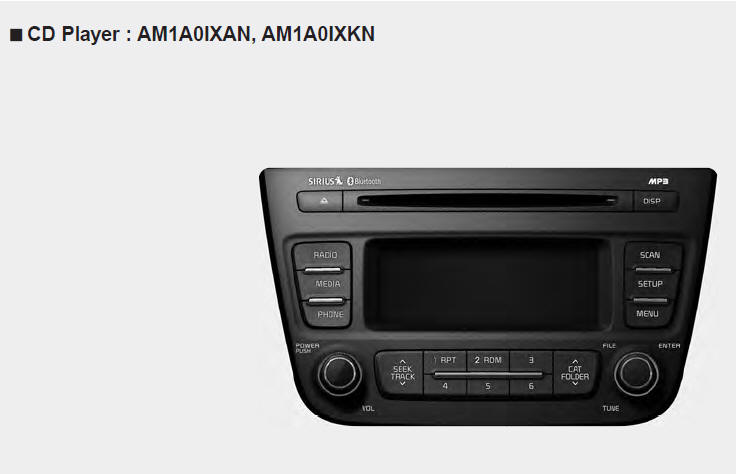
 Using the USB device
To use an external USB device, make sure the device is not connected when
starting up the vehicle. Connect the device after starting up.
If you start the engine when the USB device is connected ...

See also:
Removal
1.
Turn the ignition switch OFF and disconnect the battery negative
(-) cable.
2.
Remove the resonator and the air intake hose.
(Re ...
Front Wiper Motor Component Location
1. Cap
2. Nut
3. Wiper arm & blade
4. Retainer
5. Cowl top cover
6. Bolt
7. Wiper motor & linkage assembly
8. Wiper motor connector
...
Side Impact Sensor (SIS) Description
Side Impact Sensor (SIS) system consists of two Front-SIS which are installed
at each center of the front door module (LH and RH) and two Rear-SIS which are
installed at each rear pillar near ...
Categories
- Home
- First Generation
- Second Generation
- Kia Sorento XM 2011-2026 Owners Manual
- Kia Sorento XM 2011-2026 Service Manual
