
 Kia Sorento: ESC Control Module Removal
Second Generation XM (2011-2026) / Kia Sorento XM 2011-2026 Service Manual / Brake System / ESC(Electronic Stability Control) System / ESC Control Module Removal
| 1. |
Turn the ignition switch OFF.
|
| 2. |
Remove the surge tank. [G3.3 GDI]
(Refer to Engine Mechanical System - "Surge Tank")
|
| 3. |
Remove the brake fluid from the master cylinder reservoir with
a syringe.
|

| 4. |
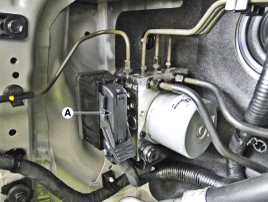
Pull up the lock of the HECU connector (A) and then disconnect
the connector.
|
| 5. |
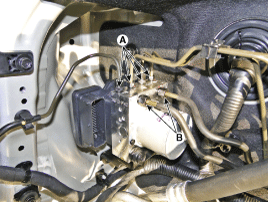
Disconnect the brake tubes from the HECU by unlocking the nuts
counterclockwise with a spanner.
|
| 6. |
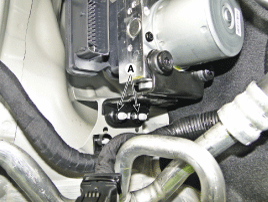
Loosen the HECU bracket nuts (A) and then remove HECU and bracket.
|
| 7. |
Remove the bolts and then remove the bracket from HECU.
|
 ESC Control Module Components
1. Front - left tube
2. Rear - right tube
3. Rear - left tube
4. Front - right tube
5. MC2
6. MC1
7. ESC control module (HECU)
8. Bracket
...
 ESC Control Module Installation
1.
Installation is the reverse of removal.
2.
Tighten the HECU mounting bolts and nuts to the specified torque.
3.
...
See also:
Removal
1.
Turn the ignition switch OFF and disconnect the battery negative
(-) cable.
2.
Disconnect the manifold absolute pressure sensor connecto ...
Inside rearview mirror
Adjust the rearview mirror so that the center view through the rear window is
seen. Make this adjustment before you start driving.
WARNING - Rear visibility
Do not place objects in the rear seat or ...
CVVT Oil Control Valve (OCV)
Continuous Variable Valve Timing (CVVT) system advances or retards the
valve timing of the intake and exhaust valve in accordance with the ECM control
signal which is calculated by the engine ...
Categories
- Home
- First Generation
- Second Generation
- Kia Sorento XM 2011-2026 Owners Manual
- Kia Sorento XM 2011-2026 Service Manual

Copyright © www.ksmanual.com 2014-2026