
 Kia Sorento: Audio Head Unit
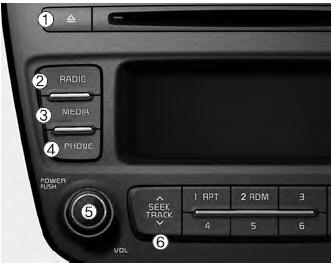
(1) 
(EJECT)
Ejects the disc.
(2) 
Changes to FM/AM/SIRIUS mode.
Each time the key is pressed, the mode is changed in order of FM1 ➟ FM2 ➟ AM ➟ SAT1 ➟ SAT2 ➟ SAT3.
❈ In Setup>Display, the radio pop up screen will be displayed when [Mode Pop
up] is turned 
.
When the pop up screen is displayed, use the
 TUNE knob or
keys  ~
~

to select the desired mode.
(3) 
Changes to CD, USB(iPod®), AUX, My Music, BT Audio mode.
Each time the key is pressed, the mode is changed in order of CD, USB(iPod®), AUX, My Music, BT Audio.
❈ In Setup>Display, the media pop up screen will be displayed when [Mode Pop
up] is turned 
.
When the pop up screen is displayed, use the
 TUNE knob or
keys  ~
~
 to select the
desired mode.
(4) 
Operates Phone Screen
❈ When a phone is not connected, the connection screen is displayed.
(5) PWR/VOL knob
 Power :
Turns power On/Off by pressing the knob
 Volume :
Sets volume by turning the knob left/right
(6) 
Radio Mode : Automatically searches for broadcast frequencies.
CD, USB, iPod®, My Music modes
- Shortly press the key (under 0.8 seconds): Moves to next or previous song (file)
- Press and hold the key (over 0.8 seconds): Rewinds or fast-forwards the current song.
BT Audio mode : Moves to next or previous song(file)
❈ The Play/Pause feature may operate differently depending on the mobile phone.
(7) 
Each time the button is shortly pressed (under 0.8 seconds), it sets the screen Off ➟ Screen On ➟ Screen Off
❈ Audio operation is maintained and only the screen will be turned Off. In the screen Off state, press any key to turn the screen On again.
(8) 
Radio Mode
- Shortly press the key : Previews each broadcast for 5 seconds each.
- Press and hold the key (over 0.8 seconds): Previews the broadcasts saved in
Preset  ~
~
 for 5
for 5
seconds each.
❈ Press the 
key again to continue listening to the current frequency.
❈ SAT Radio does not support the Preset scan feature.
CD, USB, My Music mode
Shortly press the key (under 0.8 seconds): Previews each song (file) for 10 seconds each.
❈ Press the 
key again to continue listening to the current song (file).
(9) 
Moves to the Display, Sound, Phone, System setting modes.
(10) 
Displays menus for the current mode.
❈ iPod® List : Move to parent category
(11)  TUNE
TUNE
knob
Radio mode : Changes frequency by turning the knob left/right.
CD, USB, iPod®, My Music mode: Searches songs (files) by turning the knob left/right.
❈ When the desired song is displayed, press the knob to play the song.
Moves focus in all selection menus and selects menus.
(12) 
Radio Mode
SIRIUS RADIO : Category Search
MP3, CD, USB mode : Folder Search
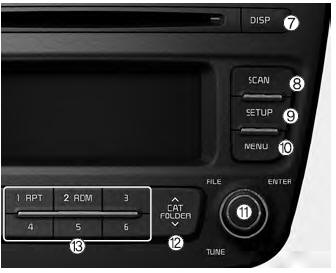
(13)  ~
~
 (Preset)
Radio Mode: Saves frequencies (channels) or receives saved frequencies (channels)
CD, USB, iPod®, My Music mode
-  :Repeat
-  :Random
In the Radio, Media, Setup, and Menu pop up screen, the number menu is selected.

 Setup
Setup
Display Settings
Press the
key Select
[Display] through
TUNE knob or
key Select
menu through
TUNE knob
Mode Pop up
[Mode Pop up]
Changes selection mode
During On state, pr ...
See also:
Inside rearview mirror
Adjust the rearview mirror so that the center view through the rear window is
seen. Make this adjustment before you start driving.
WARNING - Rear visibility
Do not place objects in the rear seat or ...
Front Wheel Speed Sensor Components
1. Front wheel speed sensor
2. Front wheel speed sensor connector
...
Fuel Tank Installation
1.
Install in the reverse order of removal.
Fuel tank band installation
bolt:
44.1 ~ 58.8 N.m (4.5 ~ 6.0 kgf.m, 32.6 ~ 43.4 lb-ft)
...
Categories
- Home
- First Generation
- Second Generation
- Kia Sorento XM 2011-2026 Owners Manual
- Kia Sorento XM 2011-2026 Service Manual
