
 Kia Sorento: Highway Driving Assist settings
| Settings Navigation | Menu Options |
|---|---|
|
|
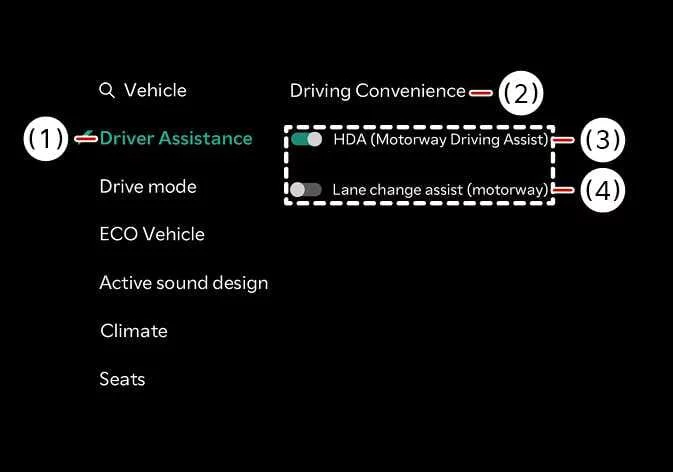
While the vehicle ignition is turned ON, tap Setup > Vehicle > Driver Assistance > Driving Convenience directly on your Kia Sorento infotainment system touchscreen to customize the operational parameters for each individual driving aid.
Selecting Highway Driving Assist within the digital menu enables the vehicle to actively support you in maintaining appropriate vehicle spacing, holding your desired cruising speed, and keeping the SUV centered precisely inside the marked lane.
Highway Lane Change Assist: (if equipped)
Enabling Highway Lane Change Assist empowers your vehicle to provide automated steering support when executing routine lane transitions on eligible roadways.
WARNING
To ensure absolute personal safety and prevent driver distraction, always adjust vehicle infotainment settings only after safely parking the Kia Sorento in a secure, designated location off the roadway.
CAUTION
When you attach a genuine Kia Trailer Kit and plug its electrical wiring harness directly into your vehicle's towing connector, Highway Driving Assist will automatically deactivate. While a trailer is connected and the system remains inactive, automated support features will be unavailable, requiring you to exercise heightened driving vigilance and steering control at all times.
TIP
-
To successfully utilize Highway Lane Change Assist during your drive, the core Highway Driving Assist function must first be fully active and engaged.
-
If a persistent technical fault or calibration error affects the Highway Lane Change Assist feature, menu options may become locked, requiring an immediate inspection by an authorized Kia dealership service department.
-
Both Highway Driving Assist and Highway Lane Change Assist remember and retain their most recent user configurations when the vehicle is turned off and subsequently restarted.
Warning Methods
| Warning Configuration | Menu Structure |
|---|---|

|
|
To modify acoustic and visual alert configurations while your Kia Sorento is powered ON, navigate through Setup > Vehicle > Driver Assistance > Warning Methods on the central display screen. You can customize the following adjustable preferences:
-
Warning Volume: Allows you to fine-tune the decibel level of active warning chimes. Even if you turn the Warning Volume down completely, safety-critical alerts will still emit a low-volume sound to protect vehicle occupants.
-
Driving Safety Priority: Automatically suppresses and lowers background multimedia audio volumes whenever a critical Driving Safety system triggers an acoustic warning prompt.
TIP
-
Customizing your Warning Methods preferences can globally apply alert styles across various other integrated advanced driver assistance technologies.
-
Configured Warning Methods settings are permanently saved in system memory, preserving your personalized choices across engine power cycles.
-
Depending on your specific vehicle trim package, regional market specifications, or software version, the Warning Methods submenu may not be featured on all models.
 Highway Driving Assist (HDA): (if equipped)
 Highway Driving Assist operation
See also:
Instrument panel overview. Engine compartment overview
Instrument panel overview
The layout of instrument panel features in your Kia Sorento may exhibit slight visual differences based on equipment
specifications, country variants, or selected i ...
Positive Crankcase Ventilation (PCV) Valve Installation
1.
Install in the reverse order of removal.
PCV Valve installation:
1.9 ~ 2.8 N.m (0.19 ~ 0.29 kgf.m, 1.4 ~ 2.1 lb-ft)
...
User Settings Mode
Description
On this mode, you can change setting of the doors, lamps, and so on.
Door
Auto Door Lock (if equipped)
...
Manuals list
- Kia Sorento MQ4 2021-2026 Owners Manual
- Kia Sorento XM 2011-2015 Owners Manual
- Kia Sorento XM 2011-2015 Service Manual
