
 Kia Sorento: Forward/Reverse Parking Distance Warning settings. Forward/Reverse Parking Distance Warning operation
Forward/Reverse Parking Distance Warning settings
Warning Methods

|
|
To customize the Warning Methods settings on your Kia Sorento while the vehicle ignition is turned ON, simply navigate through the infotainment system screen by tapping Setup > Vehicle > Driver Assistance > Warning Methods, allowing you to tailor the following alert configurations:
-
Warning Volume: Fine-tunes the audible output level of the alert chimes. Even if you choose to turn OFF the primary Warning Volume setting entirely, the system will continue to issue low-volume emergency alerts to ensure your safety.
TIP
-
Customizations made to your Warning Methods settings may also apply universally to other active driver assistance safety systems on your Kia Sorento.
-
All customized Warning Methods configurations are automatically saved and maintained even after you power OFF and restart the vehicle.
-
Depending on your specific trim level or package, the dedicated Warning Methods setting menu might not be available on all vehicle variants.
-
The Warning Volume and Haptic Warning features cannot be disabled simultaneously; turning off one option will automatically keep the other enabled for continuous protection.
Parking Distance Warning Auto On
You can configure the Parking Distance Warning system on your Kia Sorento to engage automatically whenever you drive at low speeds. To activate this convenience feature, access the infotainment display and select Setup > Vehicle > Driver Assistance > Parking Safety > Parking Distance Warning Auto On.
CAUTION
When you attach a genuine Kia Trailer Kit and plug its wiring harness connector directly into your vehicle, the Reverse Parking Distance Warning feature automatically deactivates. Consequently, you will not receive automated rear sensor assistance while towing, so please exercise extreme caution and rely on your mirrors when backing up. (The genuine Kia Trailer Kit automatically detects when a trailer is plugged in.)
TIP
When the Parking Distance Warning Auto On feature is actively selected, the physical Parking Safety button
indicator light () remains permanently
illuminated.
Forward/Reverse Parking Distance Warning operation
Parking Safety button
|
|
Press the physical Parking Safety button ( ) located on your console to manually turn ON the
Forward/Reverse Parking Distance Warning system on your Kia Sorento, and press it again whenever you wish to
switch
the function off.
) located on your console to manually turn ON the
Forward/Reverse Parking Distance Warning system on your Kia Sorento, and press it again whenever you wish to
switch
the function off.
Additionally, shifting the transmission gear selector directly into R (Reverse) will automatically engage the Parking Distance Warning system, keeping the corresponding button indicator lit.
Forward Parking Distance Warning
The Forward Parking Distance Warning system on your Kia Sorento will initiate and operate whenever any of the following driving conditions are met:
-
You shift the transmission gear selector from R (Reverse) into D (Drive) while the Reverse Parking Distance Warning system remains active.
-
The vehicle gear is in D (Drive) and the dashboard Parking Safety (
 ) button indicator light is
manually
illuminated.
) button indicator light is
manually
illuminated. -
The Forward Parking Distance Warning system automatically alerts you while driving in D (Drive) provided you have previously enabled the Parking Distance Warning Auto On setting within the infotainment screen menu.
NOTE
-
Forward Parking Distance Warning functionality is active exclusively when your Kia Sorento travels at low speeds below 6 mph (10 km/h).
-
When the transmission is engaged in R (Reverse), the front system suppresses alerts for distant objects, restricting forward warnings strictly to obstacles positioned within 24 in (60 cm) directly outside the front bumper.
-
If you choose not to activate Parking Distance Warning Auto On, the forward warning system and its button indicator will automatically switch off once your driving speed exceeds 18 mph (30 km/h) and will not re-engage automatically even if you slow back down below 6 mph (10 km/h).
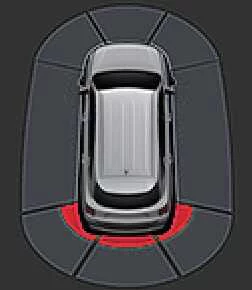
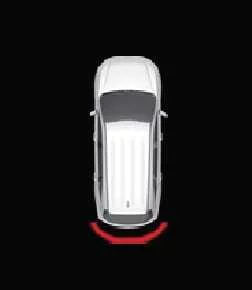
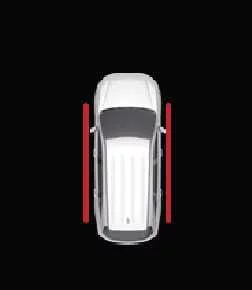
Warning indicator and warning sound
|
Distance from object |
Warning indicator |
Warning sound |
|
|---|---|---|---|
|
Instrument cluster |
Infotainment system screen |
||
|
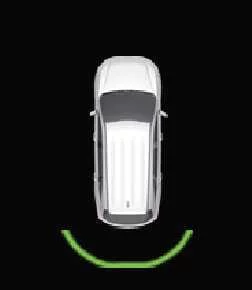
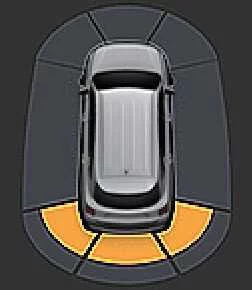
24–48 in (60–120 cm) |
|
|
Buzzer beeps intermittently (front inner side) |
|
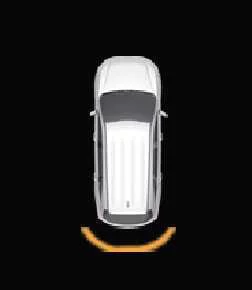
12–24 in (30–60 cm) |
|
|
Buzzer beeps more frequently |
|
within 12 in (30 cm) |
|
|
Buzzer beeps continuously |
-
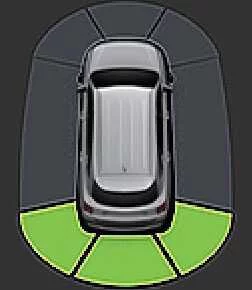
A corresponding visual indicator appears on screen alongside an audible chime whenever individual ultrasonic sensors detect pedestrians, animals, or objects within their active monitoring range.
-
When multiple obstacles are detected simultaneously around your Kia Sorento, the system prioritizes and directs its audible warning toward the closest object.
-
If an object is positioned farther than 24 in (60 cm) away, the digital instrument cluster intentionally withholds visual warning indicators.
-
The exact graphical shape of the warning indicator shown in reference illustrations may vary slightly depending on your vehicle model year and software version.
Reverse Parking Distance Warning
The Reverse Parking Distance Warning system engages automatically on your Kia Sorento the moment you shift your transmission gear selector into R (Reverse).
Warning indicator and warning sound
|
Distance from object |
Warning indicator |
Warning sound |
|
|---|---|---|---|
|
Instrument cluster |
Infotainment system screen |
||
|
24–48 in (60–120 cm) |
|
|
Buzzer beeps intermittently |
|
12–24 in (30–60 cm) |
|
|
Buzzer beeps more frequently |
|
within 12 in (30 cm) |
|
|
Buzzer beeps continuously |
-
A matching visual prompt pops up and an audible warning tone sounds whenever the rear ultrasonic sensors pick up a person, animal, or physical object within range.
-
If multiple objects are detected simultaneously while reversing your Kia Sorento, the audio alert dynamically shifts focus to the closest hazard.
-
The physical styling of the screen indicators shown in the reference manual diagrams may differ slightly from the graphics rendered on your specific vehicle display.
 Forward/Reverse Parking Distance Warning (PDW): (if equipped)
 Forward/Reverse Parking Distance Warning malfunction and precautions
See also:
IPM Specifications
Items
Specifications
Rated voltage
DC 12V
Operating voltage
DC 9 ~ 16V
Operating temperature
-30 ...
Starter Removal
1.
Disconnect the battery negative terminal.
2.
Remove the air duct and air cleaner assembly.
(Refer to Engine Mechanical System - &quo ...
Window opening and closing
Opening and closing cabin windows on the Kia Sorento is controlled directly using the individual power window
switches on each door panel.
Type A - Standard manual control switch
...
Manuals list
- Kia Sorento MQ4 2021-2026 Owners Manual
- Kia Sorento XM 2011-2015 Owners Manual
- Kia Sorento XM 2011-2015 Service Manual
