
 Kia Sorento: Crankshaft Position Sensor (CKPS) Removal and Installation
Kia Sorento (MQ4, 2021-2026) Service Manual / Engine Control / Fuel System / Engine Control System / Crankshaft Position Sensor (CKPS) Removal and Installation
| Removal |
| 1. |
Disconnect the battery negative ( - ) terminal.
|
| 2. |
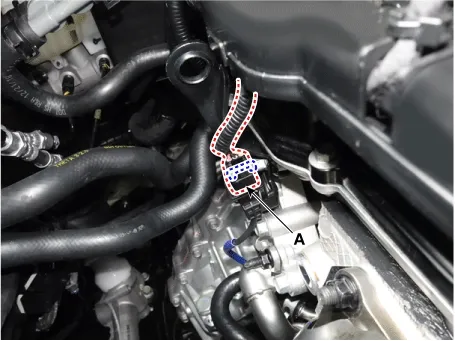
Disconnect the Crankshaft Position Sensor (CKPS) connector (A).
|
| 3. |
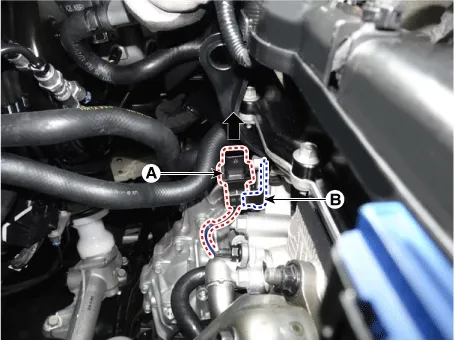
Remove the CKPS connector (A) from the bracket (B).
|
| 4. |
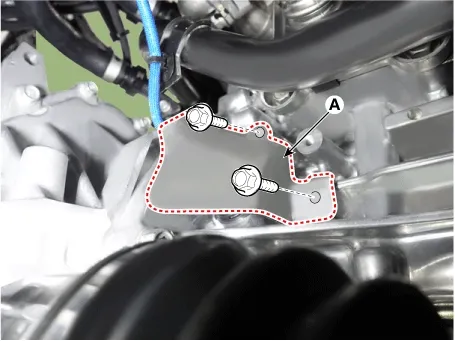
Remove the CKPS heat protector (A) after removing the mounting bolts.
|
| 5. |
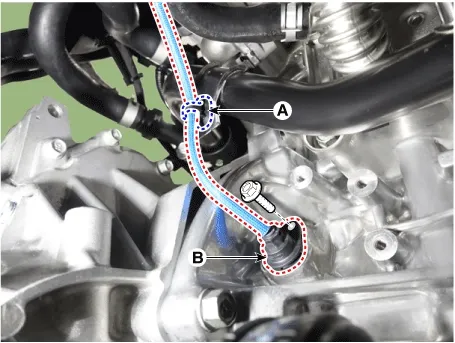
Remove the CKPS (B) by removing the bolt after removing the wiring fixing clip (A).
|
| Installation |
| 1. |
Install in the reverse order of removal.
|

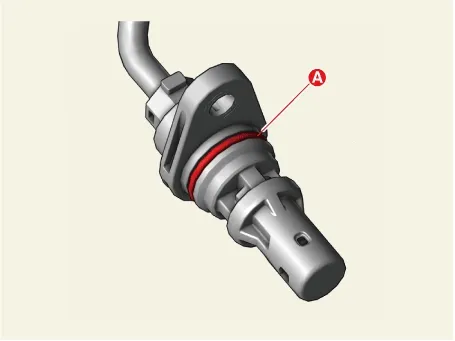
On Vehicle Inspection
1.
The engine control system can be more quickly diagnosed for problems with the KDS. (Refer to "DTC
guide")
...
 Crankshaft Position Sensor (CKPS) On Vehicle Inspection
E-CVVT Motor Specifications
Specification
Item
Specification
Motor power (W / V)
...
 E-CVVT Motor Specifications. E-CVVT Motor Components and Components Location
See also:
Multimedia Jack Installation
1.
Install the Multimedia jack.
2.
Install the console upper cover.
...
Circuit Diagram
...
Installation
1.
Install in the reverse order of removal.
Accelerator pedal module installation
nut:
16.7 ~ 25.5 N.m (1.7 ~ 2.6 kgf.m, 12.3 ~ 18 ...
Manuals list
- Kia Sorento MQ4 2021-2026 Owners Manual
- Kia Sorento XM 2011-2015 Owners Manual
- Kia Sorento XM 2011-2015 Service Manual

Copyright © www.ksmanual.com 2014-2026 - 0.0496