
 Kia Sorento: Sirius TM Radio
Using Sirius TM Satellite Radio
Your Kia vehicle is equipped with a 3 month complimentary period of SIRIUSTM Satellite Radio so you have access to over 130 channels of music, information, and entertainment programming.
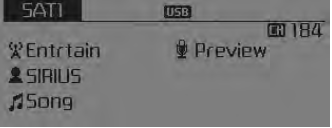
Activation
In order to extend or reactivate your subscription to SIRIUSTM Satellite Radio, you will need to contact SIRIUSTM Customer Care at 800-643- 2112. Have your 12 digit SID (Sirius Identification Number) / ESN (Electronic Serial Number) ready. To retrieve the SID / ESN, turn on the radio, press the [RADIO] button, and tune to channel zero.
Please note that the vehicle will need to be turned on, in Sirius mode, and have an unobstructed view of the sky in order for the radio to receive the activation signal.
Seek
Press the 
key 
- Shortly pressing the key (under 0.8 seconds): select previous or next channel.
- Pressing and holding the key (over 0.8 seconds): continuously move to previous or next channel.
Scan
Press the 
key 

Shortly pressing the key (under 0.8 seconds): Previews each broadcast for 5 seconds each
❈ Press the 
key again to continue listening to the current frequency
❈ If the “Category” icon is displayed, channels are changed within the current category.
Category
Press the 
key 
Set through the 
TUNE knob
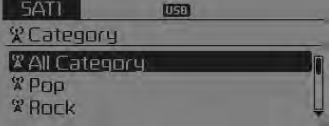
- The display will indicate the category menus, highlight the category that the current channel belongs to.
- In the Category List Mode, press the
 key to
navigate category list. - Press the tune knob to select the lowest channel in the highlighted category.
❈ If channel is selected by selecting category, then the “CATEGORY” icon is displayed at the top of the screen.
Preset
Press the 
key 
 ~
~
 • Shortly pressing the key
(under 0.8 seconds): Plays the frequency saved in the corresponding key. • Pressing
and holding the key (over 0.8 seconds): Pressing and holding the desired key from
 ~
~
 will save the current broadcast
to the selected key and sound a BEEP.
Troubleshooting
1. Antenna Error
If this message is displayed, the antenna or antenna cable is broken or unplugged. Please consult with your Kia dealership.
2. Acquiring Signal
If this message is displayed, it means that the antenna is covered and that the SIRIUSTM Satellite Radio signal is not available. Ensure the antenna is uncovered and has a clear view of the sky.
Tune
- Rotate

TUNE knob : Changes the channel number or scrolls category list. - Press

TUNE knob : Selects the menu.
Menu
Select category menu through the 
TUNE knob 
Press the key
![Info] through](images/books/3/1/page.h273.gif) Select [
Select [
 Info] through
the  TUNE knob
or  key
key
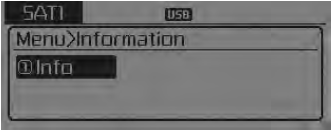
Info (Information)
Displays the Artist/Song info of the current song.
 Sirius TM Satellite Radio information
Satellite Radio channels:
SIRIUS TM Satellite Radio has over 130 channels, including
69 channels of 100% commercial-free music, plus sports, news, talk and entertainment
available nationwide in you ...
 Basic method of use :
Audio CD / MP3 CD / USB /
iPod® / My Music
Press the
key to change the mod mode in order of CD ➟ USB(iPod®) ➟ AUX ➟ My Music ➟ BT Audio.
The folder/file name i ...
See also:
Smart key precautions
The smart key will not work if any of the following occur: The smart key
is close to a radio transmitter such as a radio station or an airport which
can interfere with normal operation of the s ...
Inspection (With GDS)
1.
Check IPM input/output specification of multifunction switch using
the GDS. If the specification is abnormal, replace the lamp or wiper
switch.
...
Troubleshooting
Problem Symptoms Table
Before replacing or repairing air conditioning components, first determine
if the malfunction is due to the refrigerant charge, air flow or compressor.
Us ...
Categories
- Home
- First Generation
- Second Generation
- Kia Sorento XM 2011-2025 Owners Manual
- Kia Sorento XM 2011-2025 Service Manual
