
 Kia Sorento: Timing Chain Installation
Second Generation XM (2011-2026) / Kia Sorento XM 2011-2026 Service Manual / Engine Mechanical System / Timing System / Timing Chain Installation
| 1. |
Install the balance shaft chain.
(Refer to Lubrication system - "Balance Shaft & Oil Pump")
|
| 2. |
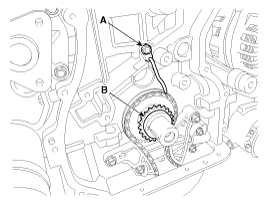
Install the crankshaft chain sprocket (B) and the timing chain oil jet
(A).
|
| 3. |
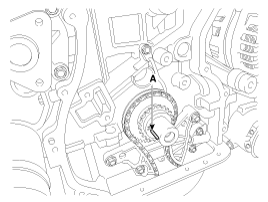
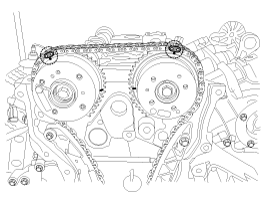
Set the crankshaft so that the key (A) of crankshaft will be aligned
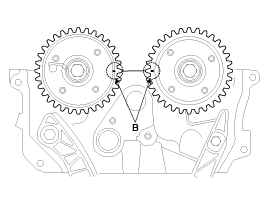
with the mating surface of main bearing cap. Put the intake and exhaust
camshaft assembly so that the TDC marks (B) of the intake and exhaust
CVVT sprockets will be aligned with the top surface of cylinder head.
As a result of this, the piston of No.1 cylinder is placed at the top
dead center on compression stroke.
|
| 4. |
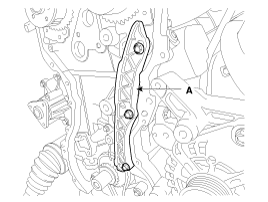
Install the timing chain guide (A).
|
| 5. |
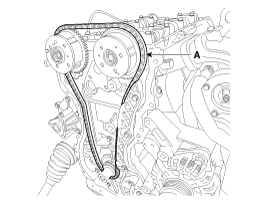
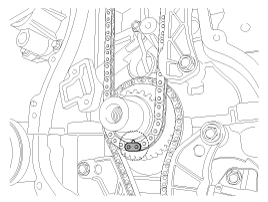
Install the timing chain. To install the timing chain with no slack
between each shaft (cam, crank), follow the below procedure.
Crankshaft sprocket (A) → Timing chain guide (B) → Intake CVVT sprocket
(C) → Exhaust CVVT sprocket (D).
|

| 6. |
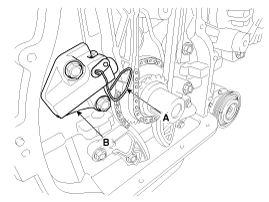
Install the timing chain tensioner arm (A).
|
| 7. |
Install the timing chain auto tensioner (B) and remove the stopper pin
(A).
|
| 8. |
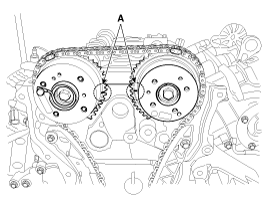
After rotating crankshaft 2 revolutions in regular direction (clockwise
viewed from front), confirm that the TDC marks (A) on the intake and
exhaust CVVT sprockets aligned with the top surface of cylinder head.
|
| 9. |
Install the timing chain cover.
(Refer to Timing System - "Timing Chain Cover")
|
| 10. |
Install cylinder head cover.
(Refer to Cylinder Head Assembly - "Cylinder Head Cover")
|
| 11. |
Add all the necessary fluids and check for leaks. Connect GDS. Check
for codes, note, and clear. Recheck.
|
 Timing Chain Inspection
Sprockets, Hydraulic Tensioner, Chain Guide, Tensioner Arm, Timing Chain
1.
Check the CVVT sprocket, crankshaft sprocket teeth for abnormal wear,
cracks or damage. Replace ...

See also:
Input Speed Sensor Removal
1.
Remove the valve body assembly.
(Refer to Hydraulic System - "Valve Body")
2.
Disconnect the input & output speed senso ...
Seat Belt Pretensioner (BPT) Removal
1.
Disconnect the battery negative cable, and wait for at least thirty
seconds before beginning work.
2.
Remove the emergency fastening de ...
LCD Display Control
The LCD display modes can be changed by using the control buttons on the steering
wheel.
[Type A]
(1) :
TRIP button for changing trip modes
(2) :
RESET button for resetting items
&# ...
Categories
- Home
- First Generation
- Second Generation
- Kia Sorento XM 2011-2026 Owners Manual
- Kia Sorento XM 2011-2026 Service Manual

Copyright © www.ksmanual.com 2014-2026