
 Kia Sorento: Using Voice Recognition
Starting Voice Recognition
Shortly press the  key on the steering
wheel. Say a command
![If prompt feedback is in [ON], then the system will say “Please say a command](images/books/3/1/page.h488.gif)
If prompt feedback is in [ON], then the system will say “Please say a command after the beep (BEEP)”
- If prompt feedback is in [OFF] mode, then the system will only say “(BEEP)”
- To change Prompt Feedback [On]/[Off], go to
![[System]](images/books/3/1/page.h489.gif)
![[Prompt Feedback]](images/books/3/1/page.h490.gif) [System]
[System]
 [Prompt Feedback]
 - For proper recognition, say the command after the voice instruction and beep tone.
Contact List Best Practices
1)Do not store single-name entries (e.g., “Bob”, “Mom”, “Kim”, etc.).
Instead, always use full names (including first and last names) for all contacts (e.g., use “Jacob Stevenson” instead of “Dad”).
2)Do not use abbreviations (i.e., use “Lieutenant” instead of “Lt.” or “Sergeant” instead of “Sgt.”).
3)Do not use acronyms (i.e., use “County Finance Department” instead of “CFD”).
4)Do not use special characters (e.g., “@”, “hyphen -“, “asterisk *”, ampersand &”).
5)If a name is not recognized from the contact list, change it to a more descriptive name (e.g., use “Grandpa Joseph” instead of “Pa Joe”).
Skipping Prompt Messages
While prompt message is being stated
 Shortly press the
 key on the steering remote controller
The prompt message is immediately ended and the beep tone will sound. After the
“beep”, say the voice command.
Re-starting Voice Recognition
While system waits for a command 
Shortly press the  key on the steering
remote controller
The command wait state is immediately ended and the beep ton will sound. After the “beep”, say the voice command.
Ending voice recognition
While Voice Recognition is operating
 Press and hold the
 key on the steering remote controller
- While using voice command, pressing any steering wheel control or a different key will end voice command.
- When the system is waiting for a voice command, say “cancel” or “end” to end voice command.
- When the system is waiting for a voice command, press and hold the
 key on the steering wheel to end
voice command.
Voice Recognition and Phone Contact Tips:
The Kia Voice Recognition System may have difficulty understanding some accents or uncommon names. When using Voice Recognition to place a call, speak in a moderate tone, with clear pronunciation To maximize the use of Voice Recognition, consider these guidelines when storing contacts:
- Do not store single-name entries (e.g., “Bob”, “Mom”, etc.). Instead, always use full names (including first and last names) for these contacts
- Do not use special characters (e.g., '@', '-', '*', '&', etc.)
- Do not use abbreviations (i.e., use "Lieutenant" instead of "Lt.") or acronyms (i.e., use "County Finance Department" instead of "C. F. D."; Be sure to say the name exactly as it is entered in the contacts list
Illustration on using voice commands
Starting voice command.
Shortly pressing the  key (under
0.8 seconds):
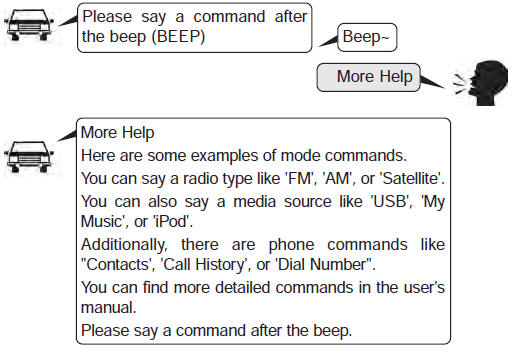
Skipping Voice Recognition
Shortly pressing the  key (under
0.8 seconds):

while guidance message is being stated
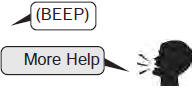
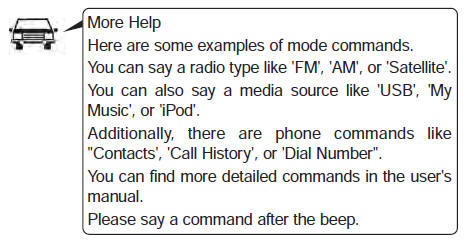
Shortly pressing the  key
key
(under 0.8 seconds)
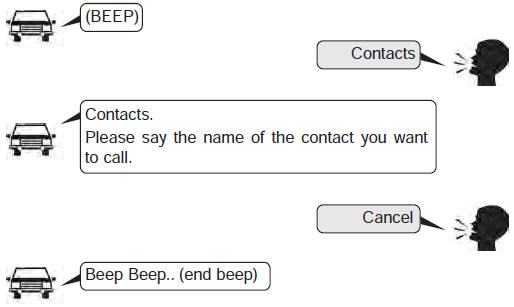
End voice command.
Shortly pressing the  key (under
0.8 seconds):

 Voice Command List
Common Commands:
These commands can be used in most operations. (However a few commands may not
be available during certain operations)
FM/AM radio commands:
Commands available during FM, ...
See also:
Component Location
1. Start relay #2 (W/O immo./smart key) /
ACC relay (With smart key)
2. Start relay #1
3. Windshield deicer relay
4. Power outlet relay
5. Wiper relay (low)
6. Burgla ...
Wheel Hub nut tightening sequence
Tighten the hub nuts as follows.
Tightening torque:
88.3 ~ 107.9N.m (9.0 ~ 11.0kgf.m, 65.1 ~ 79.6lb-ft)
...
Ignition Coil Description
An ignition coil is an induction coil in an engine's ignition system which
transforms the battery's low voltage to the high voltage needed to create an
electric spark in the spark plu ...
Categories
- Home
- First Generation
- Second Generation
- Kia Sorento XM 2011-2026 Owners Manual
- Kia Sorento XM 2011-2026 Service Manual
