
 Kia Sorento: Bluetooth® Wireless Technology Setting
The Bluetooth® word mark and logos are registered trademarks owned by Bluetooth SIG, Inc. and any use of such marks by Kia is under license.
Other trademarks and trade names are those of their respective owners. A Bluetooth® enabled cell phone is required to use Bluetooth® Wireless Technology
WARNING
Driving while distracted can result in a loss of vehicle control that may lead to an accident, severe personal injury, and death. The driver’s primary responsibility is in the safe and legal operation of a vehicle, and use of any handheld devices, other equipment, or vehicle systems which take the driver’s eyes, attention and focus away from the safe operation of a vehicle or which are not permissible by law should never be used during operation of the vehicle.
Pairing a New Device
Press the ![Select [Phone]](images/books/3/1/page.h463.gif) key
key
![Select [Pair Phone]](images/books/3/1/page.h464.gif) Select [Phone]
Select [Phone]
 Select [Pair Phone]
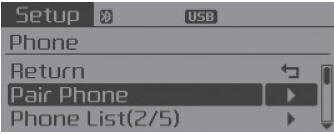
Bluetooth® Wireless Technology devices can be paired with the audio system.
Viewing Paired Phone List
Press the ![Select [Phone]](images/books/3/1/page.h466.gif) key
key
![Select [Phone List]](images/books/3/1/page.h467.gif) Select [Phone]
Select [Phone]![Select [Phone List]](images/books/3/1/page.h468.gif)
Select [Phone List]
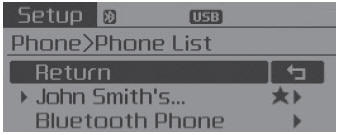
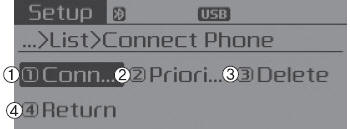
This feature is used to view mobile phones that have been paired with the audio system. Upon selecting a paired phone, the setup menu is displayed.
1) Connect/Disconnect Phone :
Connect/ disconnects currently selected phone
2) Change Priority :
Sets currently selected phone to highest connection priority
3) Delete :
Deletes the currently selected phone
4) Return :
Moves to the previous screen
- To learn more about whether your mobile phone supports contacts downloads, refer to your mobile phone user’s manual.
- The contacts for only the connected phone can be downloaded
Downloading Contacts
Press the ![Select [Phone]](images/books/3/1/page.h469.gif) key
key
![Select [Contacts Download]](images/books/3/1/page.h470.gif) Select [Phone]
Select [Phone]![Select [Contacts Download]](images/books/3/1/page.h471.gif)
Select [Contacts Download]
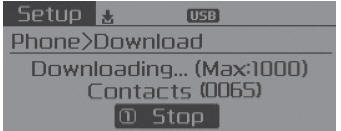
As the contacts are downloaded from the mobile phone, a download progress bar is displayed.
- Upon downloading phone contacts, the previous corresponding data is deleted.
- This feature may not be supported in some mobile phones.
- Voice Recognition may not operate while contacts are being downloaded.
Auto Download (Contacts)
Press the ![Select [Phone]](images/books/3/1/page.h472.gif) key
key
![Select [Auto Download]](images/books/3/1/page.h473.gif) Select [Phone]
Select [Phone]![Select [Auto Download]](images/books/3/1/page.h474.gif)
Select [Auto Download]
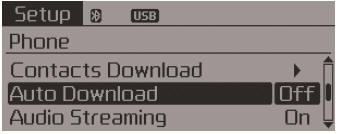
This feature is used to automatically download mobile contacts entries once a Bluetooth® Wireless Technology phone is connected.
✽ NOTICE
- The Auto Download feature will download mobile contacts entries every time the phone is connected. The download time may differ depending on the number of saved contacts entries and the communication state.
- Before downloading contacts, first check to see that your mobile phone supports the contacts download feature.
Audio Streaming
Press the ![Select [Phone]](images/books/3/1/page.h475.gif) key
key
![Select [Audio Streaming]](images/books/3/1/page.h476.gif) Select [Phone]
Select [Phone]
 Select [Audio Streaming]
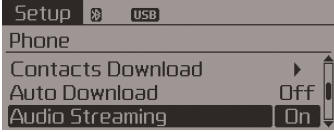
When Audio Streaming is turned on, you can play music files saved in your Bluetooth® Wireless Technology device through the audio system.
Outgoing Volume
Press the ![Select [Phone]](images/books/3/1/page.h478.gif) key
key
![Select [Outgoing Volume]](images/books/3/1/page.h479.gif) Select [Phone]
Select [Phone]
 Select [Outgoing Volume]
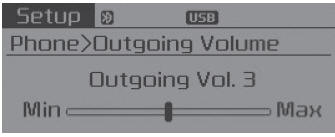
Use  TUNE knob to adjust the outgoing
volume level.
While on a call, the volume can be changed by using the
 key.
key.
Turning Bluetooth System Off
Press the ![Select [Phone]](images/books/3/1/page.h482.gif) key
key
![Select [Bluetooth System Off]](images/books/3/1/page.h483.gif) Select [Phone]
Select [Phone]
 Select [Bluetooth System Off]
Once Bluetooth® Wireless Technology is turned off, Bluetooth® Wireless Technology related features will not be supported within the audio system.
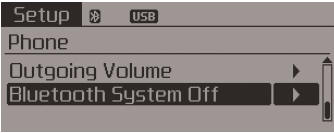
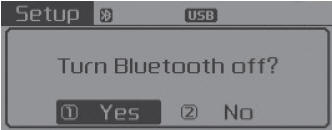
To turn Bluetooth® Wireless Technology back on, go to
![[Phone] and select “Yes”.](images/books/3/1/page.h485.gif)
 [Phone] and select “Yes”.
 Using Bluetooth® Wireless Technology
Phone Menu Screen
Phone Menus
With a Bluetooth® Wireless Technology device connected, press the
key to display
the Phone menu screen.
1) Favorite :
Up to 20 frequently used contacts saved f ...

See also:
4WD ECU Circuit Diagram and Connector
4WD ECU Connector
Pin
Function
1
MOTOR A
2
MOTOR B
3
LOCK MODE SWITCH (Input)
4
-
...
Economical operation
Your vehicle's fuel economy depends mainly on your style of driving, where you
drive and when you drive.
Each of these factors affects how many miles (kilometers) you can get from a
gallon (lit ...
Radiator Removal and Installation
1.
Disconnect the battery terminals.
2.
Remove the air cleaner assembly.
(Refer to Intake And Exhaust System - "Air Cleaner" ...
Categories
- Home
- First Generation
- Second Generation
- Kia Sorento XM 2011-2026 Owners Manual
- Kia Sorento XM 2011-2026 Service Manual
