
 Kia Sorento: AVN Head Unit Removal
Second Generation XM (2011-2026) / Kia Sorento XM 2011-2026 Service Manual / Body Electrical System / AVN System / AVN Head Unit Removal
|

| 1. |
Disconnect the negative (-) battery terminal.
|
| 2. |
Remove the center fascia panel (A).
(Refer to Body - "Crash pad")
|
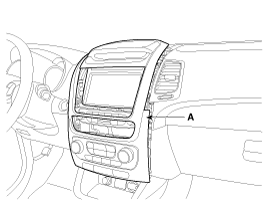
| 3. |
Disconnect the connectors and cables (A) from center fascia panel.
|
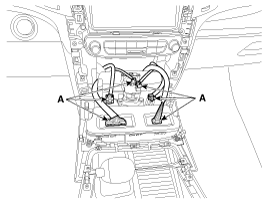
| 4. |
Remove the crash pad center air vent (A).
|
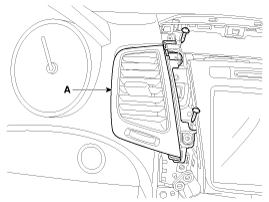
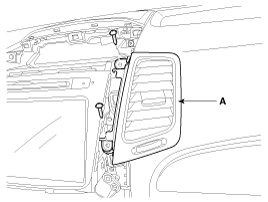
| 5. |
Remove the AVN head unit (A) after loosening the mounting screws.
|
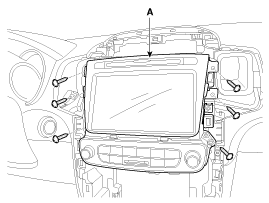
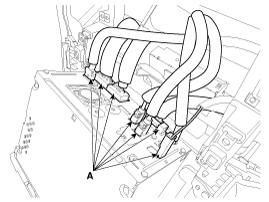
| 6. |
Remove the AVN head unit after disconnecting connectors and cables
(A).
|
 AVN Head Unit Components
AVN (A/V & Navigation) Head Unit Connector
Connector Pin Information
No.
Connector A
Connector B
Connector C
1
-
MM ...
 AVN Head Unit Installation
1.
Connect the AVN head unit connectors and cable.
2.
Install the AVN head unit.
3.
Install the center air vent ...
See also:
Removal
1.
Turn the ignition switch OFF and disconnect the battery negative
(-) cable.
2.
Remove the rear seat.
(Refer to Body - "Rear ...
Battery Removal
1.
Disconnect the battery (-) terminal and (+) terminal (A).
2.
Remove the battery mounting bracket (B) and the insulation pad
and then rem ...
Seat Belt Buckle Switch (BS) Removal
1.
Disconnect the battery negative cable, and wait for at least three
minutes before beginning work.
2.
Remove the front seat assembly. (Re ...
Categories
- Home
- First Generation
- Second Generation
- Kia Sorento XM 2011-2026 Owners Manual
- Kia Sorento XM 2011-2026 Service Manual

Copyright © www.ksmanual.com 2014-2026