
 Kia Sorento: Basic method of use :
Audio CD / MP3 CD / USB /
iPod® / My Music
Press the 
key to change the mod mode in order of CD ➟ USB(iPod®) ➟ AUX ➟ My Music ➟ BT Audio.
The folder/file name is displayed on the screen.
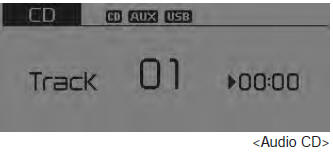
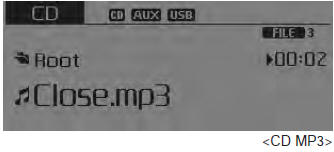
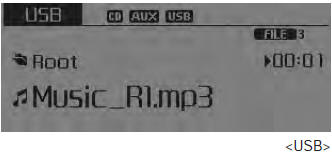
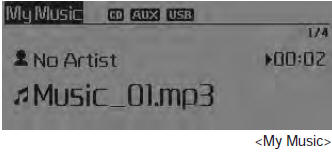
❈ The CD is automatically played when a CD is inserted.
❈ The USB music is automatically played when a USB is connected.
Repeat
While song (file) is playing

 (RPT) key
Audio CD, MP3 CD, USB, iPod®, My Music mode: RPT on screen
To repeat one song (press the key): Repeats the current song.
MP3 CD, USB mode: FLD.RPT on screen
To repeat folder (pressing twice): repeats all files within the current folder.
❈ Press the  key
key
again to turn off repeat.
Random
While song (file) is playing

 (RDM) key
Audio CD, My Music mode: RDM on screen
Random (press the key) : Plays all songs in random order.
MP3 CD, USB mode: FLD.RDM on screen
Folder Random (press the key) : Plays all files within the current folder in random order. iPod® mode: ALL RDM on screen
All Random (press the key) : Plays all files in random order. MP3 CD, USB : ALL RDM on screen
All Random (pressing twice): Plays all files in random order.
❈ Press the
 key again to turn off repeat.
Changing Song/File
While song (file) is playing

 key
key
Shortly pressing the key : Plays the current song from the beginning.
❈ If the  key is
pressed again within 2 second, the previous song is played.
Pressing and holding the key (over 0.8 seconds): Rewinds the song.
While song (file) is playing

 key
key
- • Shortly pressing the key : Plays the next song.
- • Pressing and holding the key (over 0.8 seconds): Fast forwards the song.
Scan
While song (file) is playing

 key
key
Shortly pressing the key : Scans all songs from the next song for 10 seconds each.
❈ Press the
 key again to turn off.
❈ The SCAN function is not supported in iPod® mode.
Folder Search : MP3 CD, USB Mode
While file is playing

 (Folder Up) key
Searches the next folder. While file is playing

 (Folder Down) key
Searches the parent folder.
❈ If a folder is selected by pressing the
 TUNE knob, the first file within the
selected folder will be played.
❈ In iPod® mode, moves to the Parent Folder.
Searching Songs (File)
- • Turning

TUNE knob : Searches for songs (files) - • Pressing

TUNE knob : Plays selected song (file).
Menu : Audio CD
Press the CD MP3 mode
 key to set the Repeat, Random, Information
features.
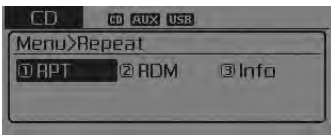
Repeat
Press the  key
key
![RPT] through the](images/books/3/1/page.h300.gif) Set [
Set [
 RPT] through the
 TUNE knob or
 key to repeat the current song.
❈ Press RPT again to turn off.
Random
Press the  key
key
![RDM] through the](images/books/3/1/page.h305.gif) Set [
Set [
 RDM] through the
 TUNE knob or
 key to randomly play songs within
the current folder.
❈ Press RDM again to turn off.
Information
Press the  key
key
![Info] through the](images/books/3/1/page.h310.gif) Set [
Set [
 Info] through the
 TUNE knob or
 key to display information of the
current song.
❈ Press the  key
key
to turn off info display.
Menu : MP3 CD / USB
Press the CD MP3 mode
 key to set the Repeat, Folder Random,
Folder Repeat, All Random, Information, and Copy features.
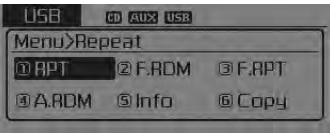
Repeat
Press the 
key ![RPT] through the](images/books/3/1/page.h318.gif) Set [
Set [
 RPT] through the
 TUNE knob or
 key to repeat the current song.
❈ Press RPT again to turn off.
 Sirius TM Radio
Using Sirius TM Satellite Radio
Your Kia vehicle is equipped with a 3 month complimentary period of SIRIUSTM
Satellite Radio so you have access to over 130 channels of music, information, and
enter ...
 Folder Random
Press the key
Set [
F.RDM] through the
TUNE knob or
key to randomly play songs within
the current folder.
❈ Press F.RDM again to turn off.
Folder Repeat
Press the key
...
See also:
IMS Power Seat Control Installation
1.
Install the power seat control switch after connecting the connector.
...
Blind Spot Detection Switch Inspection
1.
Disconnect the BSD switch connector.
2.
Operate the BSD switch, then check for continuity between terminals
of BSD switch connec ...
Components
1. Camshaft bearing cap
2. Camshaft front bearing cap
3. Exhaust camshaft
4. Intake camshaft
5. Exhaust CVVT assembly
6. Intake CVVT assembly
7. Exhaust camshaft upper ...
Categories
- Home
- First Generation
- Second Generation
- Kia Sorento XM 2011-2026 Owners Manual
- Kia Sorento XM 2011-2026 Service Manual
